Introduction
A successful Zoho ERP Implementation starts with accurate, consistent, and reliable business data. Before moving customer records, financial transactions, supplier details, or inventory information into a new system, businesses must identify and correct errors in their existing data. Without this step, even a well-configured ERP solution can produce inaccurate reports, duplicate records, and costly operational mistakes.
Data cleansing helps businesses remove duplicate entries, correct missing information, standardize formats, and ensure that important records are ready for migration. It also helps teams make better decisions after implementation.
For businesses adopting connected Zoho applications, clean data supports smoother workflows across finance, sales, inventory, and operations. At Zentegra, data quality should be treated as a core part of implementation planning, not a task to complete at the last minute.
What Is Data Cleansing in ERP Implementation?
Data cleansing, also called data cleaning or data scrubbing, is the process of finding and correcting inaccurate, incomplete, duplicated, outdated, or inconsistent information.
An ERP (enterprise resource planning) system connects important business activities through shared information. If the source data contains errors, those errors can spread across departments and affect everyday decisions.
For example, a business might store the same supplier under three different names. During migration, the new system could treat these entries as separate suppliers. This may lead to duplicate payments, incorrect purchasing reports, and confusion during reconciliation.
Data cleansing helps prevent these issues before they affect the new system.
Why Data Cleansing Matters for Zoho ERP Implementation
1. Improves Data Accuracy and Reliability
Business leaders rely on system reports to understand sales, expenses, stock levels, and customer activity. Incorrect records can make these reports misleading.
For example, an outdated customer address may cause delivery delays, while an incorrect product code may affect stock tracking.
During a Zoho Implementation, teams should verify important fields, correct inaccurate values, and confirm that records match trusted business documents. This gives employees a stronger foundation for everyday work.
2. Reduces Errors During Data Migration in ERP Implementation
Data migration in ERP implementation involves transferring relevant information from existing software, spreadsheets, or databases into the new system.
However, migration does not automatically improve data quality. If businesses transfer unverified information, they may simply move old problems into a new platform.
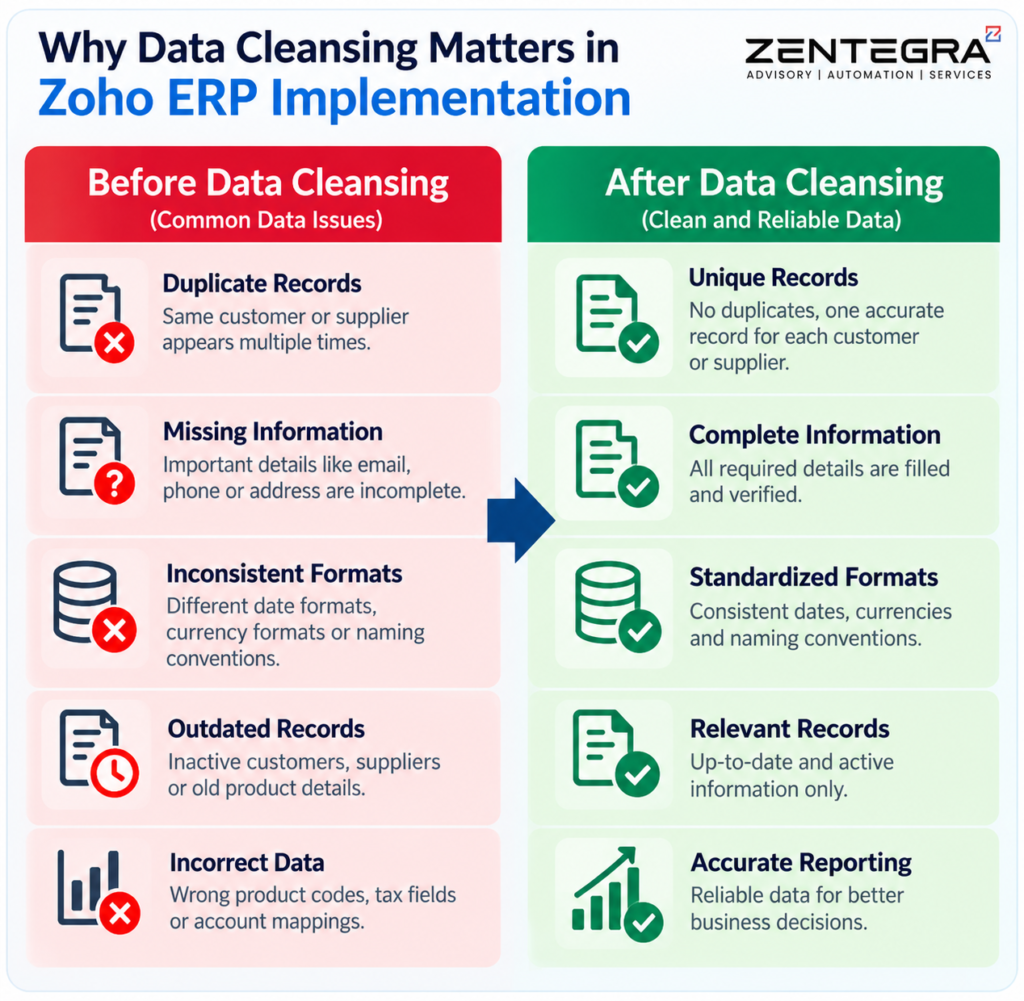
Before importing records, teams should:
- Remove duplicate customer and supplier entries.
- Correct missing or invalid contact details.
- Standardize dates, currencies, units, and naming formats.
- Review product codes, tax fields, and account mappings.
- Identify outdated records that no longer serve a business purpose.
These checks help reduce migration errors and make the transition easier to manage. Businesses migrating accounting records can also review our guide to overcoming common QuickBooks to Zoho Books migration challenges to understand data compatibility issues and account mapping.
3. Supports Better Reporting and Business Decisions
An ERP enterprise resource planning system helps businesses connect information across departments. But connected systems can only provide useful insights when the underlying records are reliable.
Consider a company that records the same product under different names in separate spreadsheets. Its inventory reports may show incorrect quantities, while purchasing teams may order items that are already available.
Clean product records help teams maintain consistent stock information, compare performance, and plan purchases more accurately.
This is especially important when businesses use analytics tools to create dashboards and measure performance. Our guide to preparing data with Zoho DataPrep and Zoho Analytics explains how teams can clean, standardize, and prepare datasets before building dashboards.
4. Saves Time and Reduces Operational Costs
Poor data quality creates extra work. Employees may spend hours checking duplicate invoices, correcting customer information, investigating stock differences, or fixing reports.
These tasks become more difficult after the new system goes live because multiple teams may depend on the same records.
Cleaning data before migration reduces avoidable corrections and helps employees focus on their main responsibilities. Although data cleansing requires time and planning, addressing errors early can prevent more expensive problems later.
5. Strengthens Audit Data Management and Compliance
Audit data management involves organizing, validating, retaining, and reviewing records so that businesses can support financial checks, internal audits, and compliance activities.
For Indian businesses, reliable records can support accounting reviews, GST-related reconciliation, and the maintenance of relevant business documents. However, data cleansing alone does not guarantee compliance.
The Digital Personal Data Protection Act, 2023, and the Digital Personal Data Protection Rules, 2025, establish a framework for handling digital personal data. Businesses should review their applicable obligations and the notified implementation timeline. They should also follow relevant requirements under the CGST Act, 2017, the Companies Act, 2013, and applicable record-retention rules, depending on their activities.
During data cleansing, businesses should correct inaccurate records while preserving documents and transaction histories that they must retain. They should also control access to personal and financial information.
For official information about India’s data-protection framework, consult the Digital Personal Data Protection Rules, 2025, published by MeitY, and verify the provisions and commencement dates that apply to your business.
Common Data Quality Problems to Fix Before Migration
Data problem | Example | Recommended action |
Duplicate records | One customer appears multiple times | Identify duplicates and merge records carefully |
Missing information | Supplier record has no valid tax details | Verify information using trusted documents |
Inconsistent formats | Dates use different formats | Standardize formats before import |
Outdated records | Old customer or supplier details | Verify, update, archive, or exclude as appropriate |
Incorrect financial data | Opening balances do not match reports | Reconcile balances with approved financial records |
Invalid product details | Duplicate SKUs or incorrect units | Standardize product codes, units, and descriptions |
Not every old record should be deleted. Businesses must distinguish between unnecessary data and historical information required for reporting, audit, or legal purposes.
Best Practices for Data Cleansing Before Zoho Implementation
A structured approach makes data preparation easier to manage and verify.
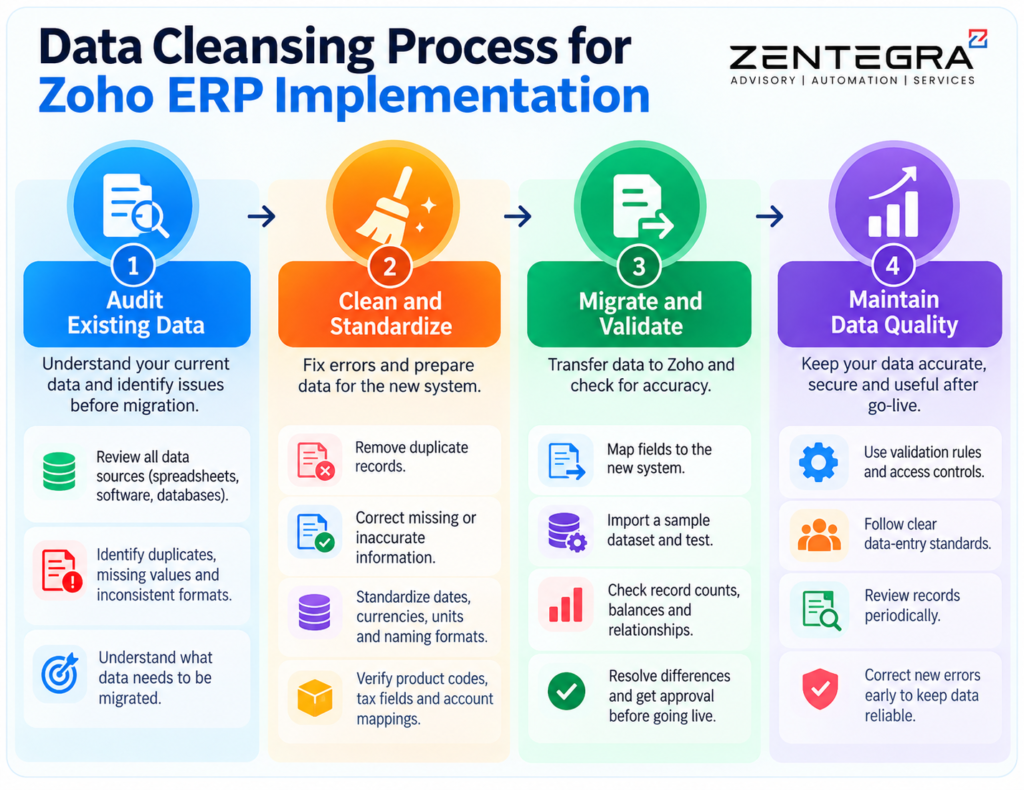
Step 1: Conduct a Data Audit
Start by identifying every source of business information. These may include spreadsheets, accounting software, CRM platforms, inventory tools, and legacy databases.
Review record counts, field formats, missing values, duplicates, and data ownership. This initial audit helps teams understand the scale of the work.
Step 2: Define Data Quality Rules
Agree on what a valid record should contain. For example, define acceptable email formats, product naming rules, unique customer identifiers, and required financial fields.
Assign responsibility for reviewing each data category so that important decisions do not remain unresolved.
Step 3: Clean and Standardize the Data
Correct errors, remove confirmed duplicates, and apply consistent formats. Verify important changes with the relevant department.
For larger datasets, data preparation tools can help identify patterns and inconsistencies. Zoho DataPrep supports data cleansing and preparation for migration and analytics. For more practical guidance, read our guide to cleaning and managing CRM data with Zoho DataPrep to learn how to standardize records and identify duplicates before importing information into Zoho CRM.
Step 4: Map Fields to the New System
The source system and target system may use different field names or structures. Map each source field to the correct destination field before importing records.
For example, customer IDs, supplier details, tax information, and product units must match the intended fields in the target applications. Test the mapping to avoid losing information or assigning values incorrectly.
Step 5: Test Migration and Reconcile Results
Import a sample dataset into a test environment before the final migration. Check record counts, relationships, opening balances, outstanding invoices, and inventory quantities.
For additional guidance, Microsoft’s ERP data-management and migration best practices explain why businesses should maintain accurate, complete, reliable, and up-to-date information throughout implementation.
Step 6: Maintain Data Quality After Go-Live
Data cleansing is not a one-time activity. New errors can appear as employees add records and business processes change.
Use validation rules, clear data-entry standards, access controls, and periodic reviews to maintain quality. A defined process for correcting records helps prevent the same issues from returning.
How Zentegra Can Help With a More Reliable Zoho Implementation
Preparing data requires business knowledge as well as technical planning. Teams must understand which records to retain, how information should move between applications, and how the new system will support daily operations.
Zentegra helps businesses plan and implement Zoho-powered solutions around their operational needs. A structured implementation approach can include reviewing existing workflows, preparing data for migration, mapping fields, testing integrations, and validating the system before launch.
Explore Zentegra’s Zoho business automation services to discover how connected Zoho applications can streamline workflows and support more efficient business operations. You can also review the Zoho CRM implementation guide for additional guidance on preparing CRM data and configuring business workflows.
The right approach depends on the applications involved, the quality of existing records, and the complexity of the migration. Clear ownership and careful testing help businesses reduce risk and build a more dependable system.
Frequently Asked Questions(FAQs)
The purpose of data cleansing is to identify and correct inaccurate, incomplete, duplicate, or outdated data. It improves data quality, supports reliable reporting, and helps businesses make better decisions. During Zoho ERP Implementation, data cleansing also helps prevent errors when migrating customer, supplier, financial, and inventory records.
Data cleaning is essential because inaccurate or inconsistent data can lead to misleading results and poor business decisions. Clean data helps analysts identify trends, measure performance, and generate reliable reports. It also improves the accuracy of dashboards and business insights across connected ERP applications.
The primary reason for data cleansing is to ensure that data is accurate, consistent, complete, and suitable for its intended use. Businesses remove duplicate records, correct errors, and standardize formats to reduce operational problems. This is particularly important during data migration in ERP implementation, where poor-quality data can affect multiple business processes.
Data cleaning is the process of detecting and correcting errors, missing values, duplicates, and inconsistencies in a dataset. It is an important part of data preprocessing because it prepares information for analysis, reporting, and system integration. Before a Zoho Implementation, data cleaning helps businesses prepare reliable records, improve migration accuracy, and establish a stronger foundation for effective business automation.
Conclusion
Data cleansing is a critical step in successful ERP implementation because it helps businesses move accurate, consistent, and useful information into their new system. It improves reporting, reduces migration errors, supports audit data management, and helps employees work with greater confidence.
Before starting a Zoho ERP Implementation, review your existing data, establish clear quality rules, clean and map records, and test the migration thoroughly. Continue monitoring data quality after launch to protect the value of your investment.
With thoughtful planning and the right implementation support, Zentegra can help businesses build connected workflows and make better use of their Zoho applications. Clean data is not simply a technical requirement; it is a foundation for more reliable operations and informed business decisions.