
Running out of a fast-moving product can mean lost sales. Ordering too much can trap cash in inventory that sits for months. For small and mid-sized businesses, zoho inventory management provides a way to address both problems by connecting stock tracking, warehouse operations, purchasing, sales channels, and replenishment in one system.
But simply using inventory software does not guarantee better inventory control. The real gains come from configuring reorder levels correctly, maintaining accurate inventory data, tracking stock by location, connecting sales channels, and reviewing performance regularly.
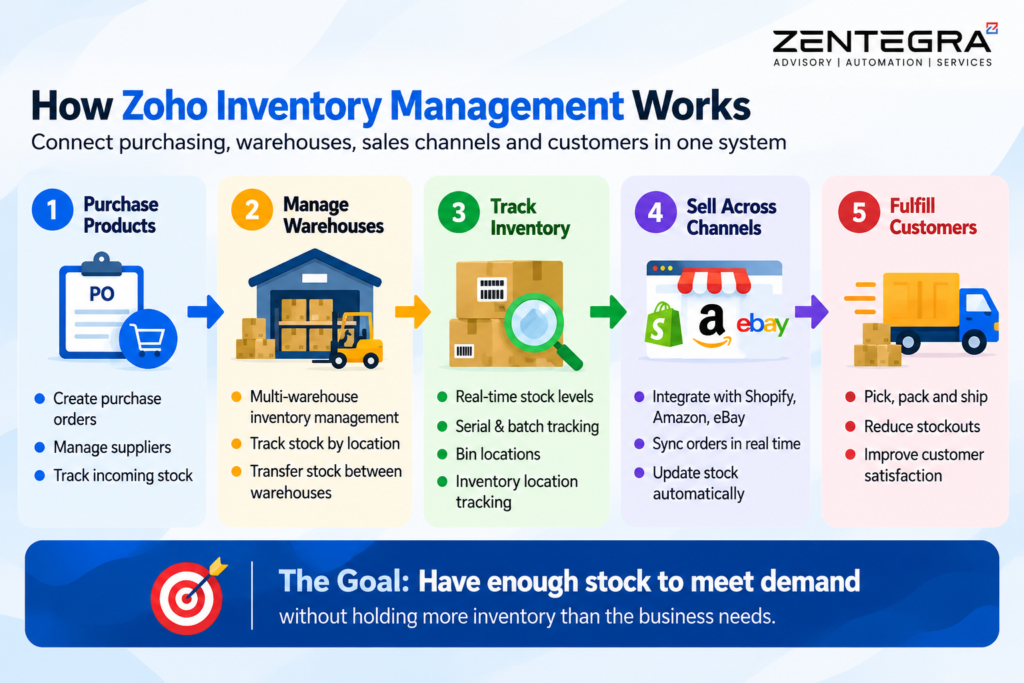
Zoho Inventory supports multi-warehouse operations, serial and batch tracking, reorder alerts, purchase workflows, and integrations with channels such as Shopify, Amazon, and eBay, as highlighted on the official Zoho Inventory product page.
The goal is simple: have enough stock to meet demand without holding more inventory than the business needs.
Zoho Inventory Management Features That Help Control Stock
Effective inventory management starts with visibility. If your team cannot tell what is available, where it is stored, or when it needs replenishment, even the best purchasing strategy can fail.
Zoho Inventory brings several capabilities together to improve that visibility.
Multi-Warehouse Inventory Management
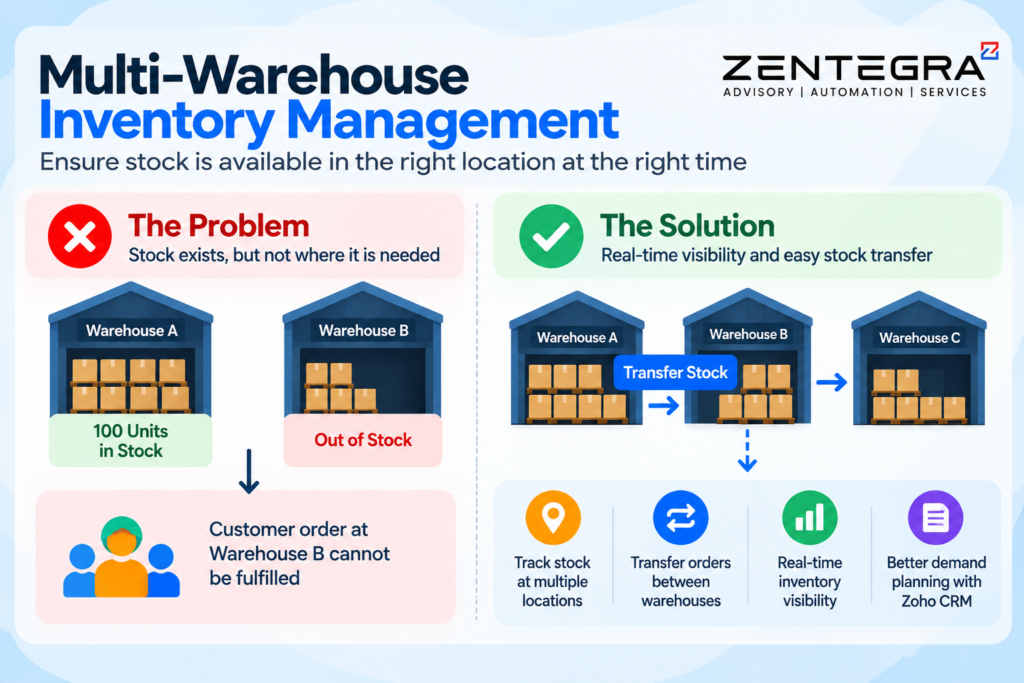
Businesses with more than one warehouse often face a simple but costly problem: stock exists, but not necessarily where it is needed.
For example, Warehouse A may have 100 units while Warehouse B is about to run out. Looking only at total inventory can make the business appear well stocked, while a customer order at Warehouse B still cannot be fulfilled.
Multi-warehouse inventory management helps businesses monitor stock at different locations and move products between warehouses when demand changes. Zoho Inventory supports multiple warehouse locations and transfer orders, allowing businesses to manage stock movements from a centralized system. When inventory is aligned with sales data, businesses can improve demand planning using Zoho CRM setup features for business growth.
This improves warehouse inventory management because teams can make decisions using location-level stock information instead of spreadsheets or disconnected records.
Inventory Tracking and Location Visibility
Accurate inventory tracking is the foundation of reliable fulfillment. To gain deeper insights into stock performance, businesses can use Zoho Analytics dashboards for real-time reporting and data-driven decisions.
Zoho Inventory can track item movements and provide visibility into stock across warehouses. Businesses can also use bin locations to identify where products are physically stored.
This makes inventory location tracking particularly useful for businesses with large product catalogs. Instead of searching through shelves or relying on employee memory, warehouse teams can use system information to identify where an item should be picked.
Serial and Batch Tracking
Some products need more than quantity-based stock tracking.
Serial number tracking can help businesses monitor individual units, while batch tracking can help manage products with expiry dates. Zoho Inventory supports both methods and allows batch information such as manufacturing and expiry dates to be recorded.
For businesses handling food, pharmaceuticals, electronics, or other products requiring traceability, this type of stock tracking can reduce errors and improve control over inventory.
How to Set Reorder Rules Without Creating Overstock
Reordering too late causes stockouts. Reordering too early creates excess inventory. The solution is not simply to order more—it is to establish sensible reorder rules.
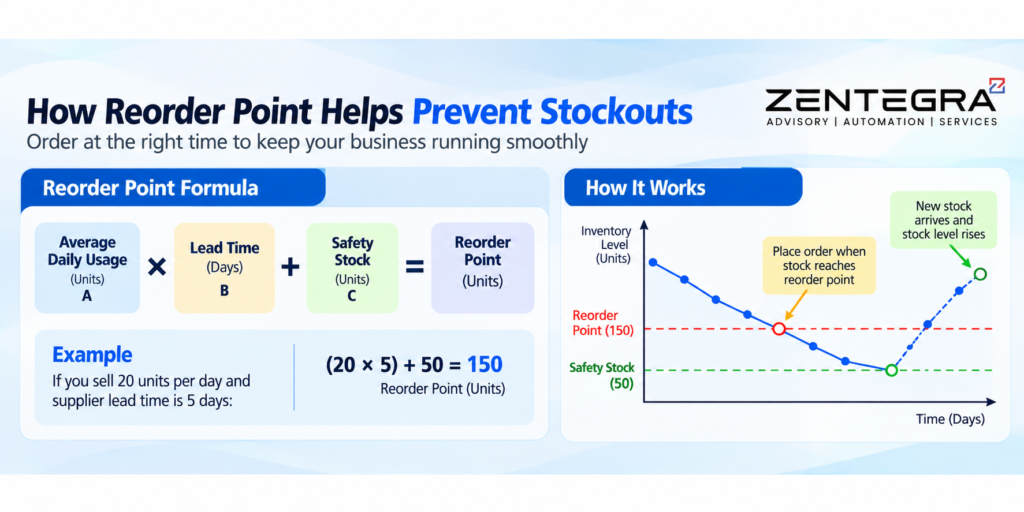
A reorder point tells the business when it should replenish an item. According to Shopify’s reorder point guide, businesses can calculate reorder levels using demand and lead time to avoid stockouts and overstocking. Zoho explains that reorder levels can be based on historical demand and safety stock, helping businesses identify when inventory is approaching a level that requires action.
A simple starting point is:
Reorder Point = Average Daily Usage × Lead Time + Safety Stock
For example, if a business sells 20 units per day and its supplier takes five days to deliver, expected demand during lead time is 100 units. Additional safety stock can then be added to protect against demand spikes or supplier delays.
However, reorder points should not remain unchanged forever.
Review Reorder Levels as Demand Changes
Seasonality, promotions, new products, and changing customer behavior can all affect demand.
A reorder point that worked during a slow month may be too low during a holiday period. The same setting may be unnecessarily high after demand falls.
Review reorder levels regularly using recent sales data. Businesses with strong seasonal patterns should review important SKUs before expected demand increases rather than waiting for stockout alerts.
Automate Inventory Management With Zoho Inventory
Manual inventory processes become difficult to maintain as order volumes increase. Automation can remove repetitive work while giving employees more time to handle exceptions and decisions. Tools like Zoho Flow no-code automation allow businesses to connect inventory with other applications and automate processes without technical complexity.
Zoho Inventory provides reorder alerts, automation capabilities, purchasing workflows, and integrations designed to reduce manual inventory work.
Automate Purchase Replenishment
When an item’s stock reaches its reorder level, the system can alert the team so replenishment can begin.
The quality of this workflow depends on the information behind it. Businesses should maintain accurate:
- SKU information
- Preferred vendors
- Reorder levels
- Lead times
- Reorder quantities
- Current stock levels
Automation cannot correct poor inventory data. It simply processes the rules the business gives it.
Sync Inventory Across Sales Channels
Selling through multiple channels creates another inventory challenge.
Imagine a business selling the same product through Shopify, Amazon, and a physical store. If each channel maintains a separate stock figure, one sale may not immediately be reflected elsewhere. That creates a risk of overselling.
Zoho Inventory integrates with sales channels including Shopify, Amazon, eBay, and Etsy, helping businesses centralize orders and synchronize stock information.
This is especially useful for businesses that depend on multi-channel inventory management.
Use Batch and Expiry Tracking
For products with limited shelf life, inventory value can decline even when stock remains physically available.
Batch tracking can help businesses identify products approaching expiry so they can take action earlier. Depending on the product, that could mean prioritizing sales, transferring stock, offering promotions, or adjusting purchasing decisions.
Measure Inventory Performance With the Right KPIs
A business cannot improve inventory management if it does not measure performance.
KPI | What it tells you | Why it matters |
Inventory turnover | How quickly inventory is sold | Identifies slow-moving or excess stock |
Carrying cost | Cost of holding inventory | Shows the financial impact of excess stock |
Stockout rate | How often products are unavailable | Highlights replenishment problems |
Fill rate | How many orders are fulfilled completely | Measures product availability |
Inventory accuracy | How closely records match physical stock | Identifies tracking problems |
Inventory Turnover
Inventory turnover measures how frequently inventory is sold and replaced during a period.
A declining turnover rate may indicate that products are staying in storage longer. However, the ideal level varies by industry, product type, and business model, so companies should compare the metric against their own historical performance and relevant industry benchmarks.
Carrying Cost
Carrying cost includes expenses associated with holding inventory, such as storage, insurance, capital tied up in stock, and losses from obsolete products.
Reducing unnecessary inventory can therefore release cash that the business can use elsewhere.
Stockout and Fill Rate
Stockout rate and fill rate provide another view of inventory performance.
If stockouts are frequent, the business may need to review reorder points, supplier lead times, safety stock, or forecasting. If inventory levels are high but fill rates remain poor, the problem may be distribution or location-related rather than a simple shortage of stock.
A Practical Zoho Inventory Management Example
Consider a distributor with about 1,200 SKUs across two warehouse locations.
Before implementation, the business relies heavily on spreadsheets and manual stock counts. It has no consistent reorder rules, supplier lead times are not recorded, and orders from online sales channels are not synchronized effectively.
The first step is not to turn on every available feature. Instead, the business should identify the data and workflow gaps.
A practical implementation could include:
- Cleaning SKU and product data.
- Reviewing historical sales velocity.
- Establishing reorder points for important SKUs.
- Recording supplier lead times.
- Mapping warehouse and bin locations.
- Connecting relevant sales channels.
- Creating purchasing and replenishment workflows.
- Monitoring inventory KPIs after launch.
The result should be a more predictable inventory process. However, businesses should avoid treating any specific percentage reduction in stockouts or carrying costs as guaranteed. Results depend on product mix, demand patterns, supplier reliability, data quality, and implementation quality.
What to Prepare Before Implementing Zoho Inventory
Technology works best when the underlying business data is ready.
Before going live, review your:
- Product and SKU master
- Opening inventory
- Warehouse locations
- Bin locations
- Vendor information
- Supplier lead times
- Reorder levels
- Sales history
- Sales channel integrations
- Accounting integration
- User responsibilities
Zoho Inventory integrates with Zoho Books, allowing inventory and accounting information to flow between the two systems and reducing duplicate data entry.
The current Zoho Inventory plans also differ by order limits, users, locations, and advanced features, so businesses should select a plan based on their actual operating requirements rather than choosing solely on price. Zoho’s current published plans include Free, Standard, Premium, Plus, and Enterprise tiers.
For a growing business, planning these requirements before implementation can prevent unnecessary workarounds later.
Frequently Asked Questions About Zoho Inventory Management
Zoho Inventory is a cloud-based inventory and order management platform that helps businesses manage purchasing, sales orders, warehouses, stock tracking, fulfillment, and inventory-related workflows from a centralized system.
Yes. Zoho Inventory supports multi-warehouse operations, including warehouse-level inventory visibility and stock transfers between locations. This makes it suitable for businesses that store products in more than one facility.
Zoho Inventory can use reorder levels and alerts to identify when stock reaches a defined threshold. Businesses can combine these alerts with demand history, safety stock, supplier lead times, and purchasing workflows to create a more reliable replenishment process.
Yes. Zoho Inventory supports integrations with platforms including Shopify, Amazon, eBay, and Etsy. These integrations can synchronize orders and stock information, helping businesses reduce manual updates and the risk of overselling.
Yes. Zoho Inventory supports serial number and batch tracking. Batch tracking can include manufacturing and expiry information, while serial tracking can help businesses follow individual units through inventory transactions.
Yes. Zoho positions Inventory as a system for small and growing businesses, with plans that scale based on order volume, users, locations, and features. The current product also offers a free plan with limited usage and paid plans for businesses with greater requirements.
Conclusion
Stockouts and excess inventory may look like two separate problems, but they often come from the same underlying issue: poor visibility and inconsistent inventory processes.
Effective zoho inventory management brings those processes together. As part of a broader strategy, businesses should consider digital transformation for business growth to fully integrate inventory, sales, and operations. Multi-warehouse inventory management can improve location visibility, inventory tracking can provide better stock accuracy, reorder rules can support timely replenishment, and integrations can keep inventory information aligned across sales channels.
The important point is that software alone is not the solution. The value comes from configuring the system around real demand, accurate data, supplier lead times, warehouse processes, and measurable business goals.
For businesses reviewing an existing setup or preparing to implement Zoho Inventory, a structured assessment can identify where inventory processes are creating unnecessary stockouts, excess carrying costs, or manual work.
Zentegra can help businesses evaluate their Zoho environment, identify process gaps, and build practical Zoho solutions around their operational needs.