

Introduction
Following up with leads consistently becomes increasingly difficult as a sales team grows. Sales representatives may be managing dozens or even hundreds of prospects at different stages of the sales process. Missed follow-ups, delayed emails, and inconsistent communication can result in lost opportunities.
A well-structured Zoho CRM cadence helps businesses create a more organized approach to lead engagement. Instead of relying entirely on sales representatives to remember when to contact every prospect, teams can create structured sequences of activities and follow-ups.
With the right Zoho CRM cadence automation strategy, businesses can streamline sales outreach, improve follow-up consistency, and give sales teams a clearer process for engaging with prospects.
In this guide, we’ll explain what Zoho CRM Cadences documentation are, how a CRM cadence works, the benefits of using a Zoho CRM sales cadence, practical use cases, and best practices for creating more effective follow-up workflows.
What is Zoho CRM Cadence?
A Zoho CRM cadence is a structured sequence of sales activities designed to help teams engage with leads and prospects consistently over time.
To get a deeper understanding of how cadence automation works in real scenarios, you can explore this detailed guide on Zoho CRM cadences automation for lead engagement.
Zoho CRM cadence is a structured workflow that automates sales activities such as emails, calls, and follow-ups. For an official overview of CRM capabilities, refer to the Zoho CRM product documentation. It helps sales teams stay consistent with outreach while reducing manual work.
Instead of remembering every follow-up, the system schedules cadence calls, sends reminders, and tracks responses automatically.
For example, a simple sales cadence may look like this:
- Day 1: Send an introductory email
- Day 3: Follow up with a sales call
- Day 6: Send a reminder or follow-up email
- Day 10: Contact the prospect again based on their engagement
The goal is not simply to automate communication. A successful CRM cadence helps create a repeatable and organized process while allowing sales teams to engage with leads at the right time.
Key Benefits:
- Improves follow-up consistency
- Saves time with call automation
- Increases lead conversion rates
- Provides clear visibility into sales activities
Understanding Business Analytics in CRM
Business analytics refers to the process of analyzing data to make better business decisions. If you want a broader understanding, this guide on what is business analytics explains core concepts in simple terms. In CRM systems, it helps you understand customer behavior, sales performance, and marketing effectiveness.
With Zoho CRM and Zoho Analytics, businesses can:
- Track sales trends
- Measure campaign success
- Identify high-performing channels
- Predict future outcomes
Analytics transforms raw data into meaningful insights that drive growth. You can also learn how to forecast business performance using analytics in this guide on forecasting with Zoho Analytics for business planning.
What is Query Analytics?
Query analytics focuses on analyzing specific data queries to extract useful information. You can explore how data queries work in analytics systems through this resource on SQL and data analysis basics. It helps businesses understand patterns and answer key questions such as:
- Which leads convert faster?
- What type of cadence calls work best?
- Which sales reps perform better?
By using query analytics, companies can refine strategies and improve decision-making.
Role of Zoho Analytics Join Tables
Zoho Analytics join tables allow you to combine data from multiple sources into one unified dataset. For a technical explanation of joins, see this guide on SQL JOIN types explained. This is essential for deep analysis.
For example:
Data Source | Purpose |
CRM Leads | Customer details |
Call Logs | Cadence calls tracking |
Campaign Data | Marketing performance |
By joining these tables, you can create a complete view of customer interactions.
Types of Joins in Zoho Analytics:
- Inner Join: Matches data from both tables
- Left Join: Includes all records from the left table
- Right Join: Includes all records from the right table
- Full Join: Combines all records from both tables
These joins help create powerful reports and dashboards. For a complete explanation, check this detailed article on Zoho Analytics join tables.
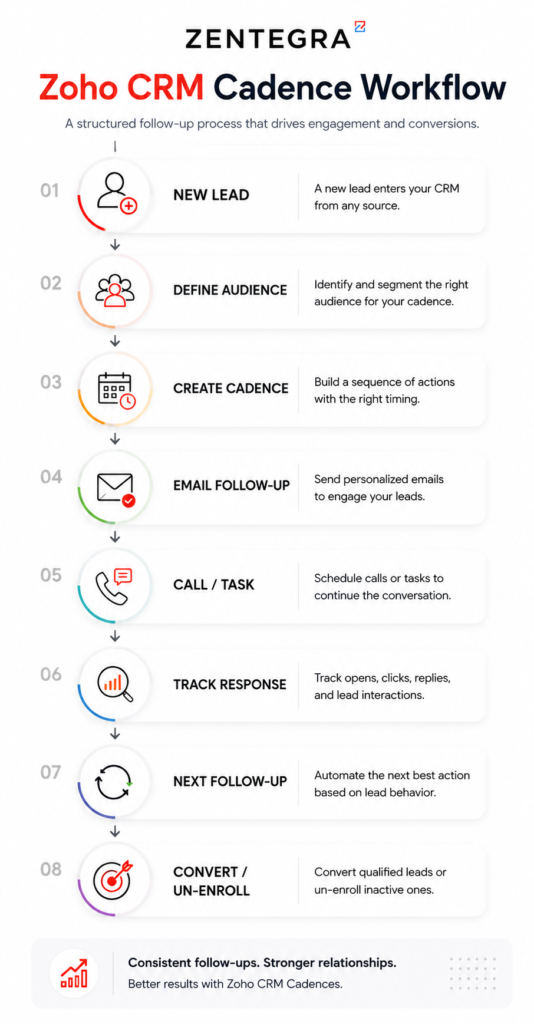
How Do Zoho Cadences Work?
Zoho Cadences can help businesses structure the way sales teams communicate with leads throughout the sales journey.
The process generally starts by identifying the audience and determining what actions should happen at different stages of engagement.
1. Define the Target Audience
The first step is identifying which leads or prospects should be part of a particular cadence.
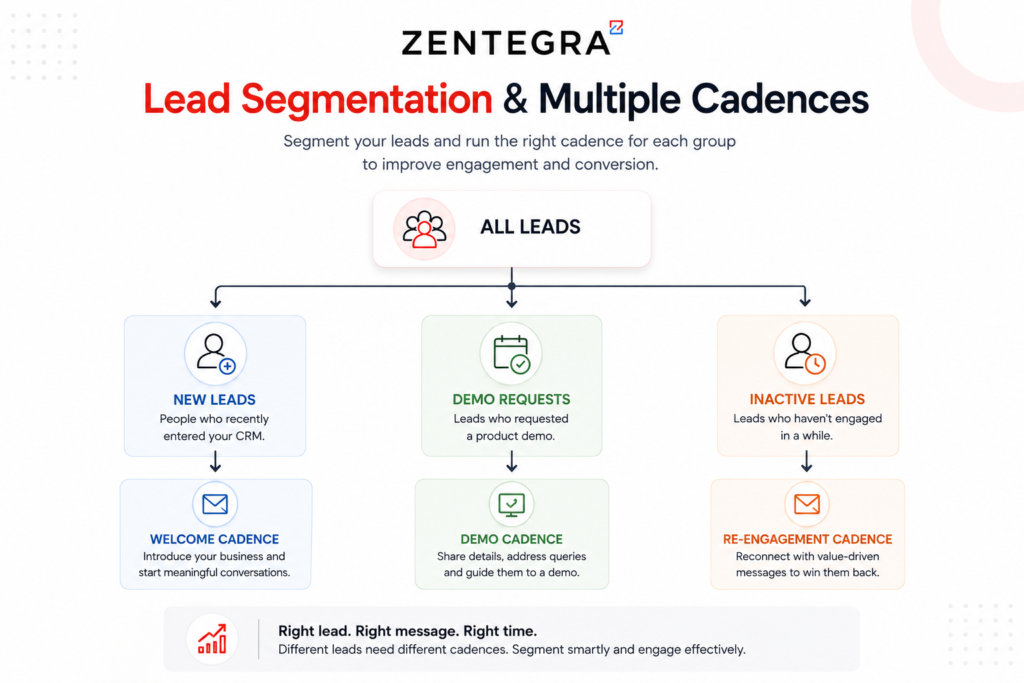
Not every lead should receive the same communication sequence. For example, a new website inquiry may require a different approach from an existing prospect who attended a product demo.
Businesses can create different engagement strategies for different types of prospects.
2. Create the Engagement Sequence
Next, the sales team defines the activities that should take place.
A sequence might include a combination of emails, calls, tasks, and follow-up actions. The timing between each activity should reflect the sales cycle and the type of customer being contacted.
3. Add Follow-Up Activities
A strong Zoho CRM sales cadence provides a clear process for what the sales representative should do next.
For example:
Send Email → Wait → Make a Call → Follow Up → Continue Engagement
This gives sales representatives a structured workflow instead of relying on memory or manually maintained spreadsheets.
4. Engage With Leads Consistently
Once leads are included in the cadence, sales teams can follow a more consistent engagement process.
This can help reduce common problems such as forgotten follow-ups, inconsistent communication, and delays in responding to interested prospects.
5. Monitor and Improve the Process
A sales cadence should not remain unchanged forever. Businesses should regularly review how their engagement process is performing and identify opportunities for improvement.
For example, a business may find that:
- Prospects respond better to shorter email sequences
- Certain follow-up timings generate more responses
- One audience segment requires more personalized communication
- Some sales activities are not contributing to conversions
These insights can help teams refine their cadence over time.
Zoho also explains the difference between Cadences and Workflow Rules
How Zoho CRM Cadence Works with Analytics
Zoho CRM cadence becomes much more effective when it works alongside analytics tools. Together, they help you not only automate actions but also understand what is working and what needs improvement. This combination turns your sales process into a smart, data-driven system.
Step-by-Step Process :
1. Capture Leads in Zoho CRM
Every sales journey starts with a lead. Leads can come from your website, ads, social media, or manual entry. Zoho CRM automatically stores all lead details such as name, contact information, and source.
Why it matters: You get a central place to manage all prospects without missing anyone.
2. Assign Cadence Workflows
Once leads are captured, you assign them to a cadence workflow. This workflow defines when and how to contact the lead.
For example:
- Day 1: Intro email
- Day 2: Follow-up call
- Day 4: Reminder email
Why it matters: It creates a clear and consistent communication plan for every lead.
3. Automate Calls and Emails
With call automation, Zoho CRM schedules and triggers actions automatically. Emails are sent on time, and cadence calls are scheduled without manual effort.
Sales reps also get reminders so they never forget a follow-up.
Why it matters: Saves time and ensures timely communication with every prospect.
4. Track Interactions Using Call Automation
Every interaction—calls, emails, responses—is tracked inside the system. You can see:
- Who answered your call
- Which emails were opened
- How leads responded
Why it matters: You get complete visibility into customer behavior and engagement.
5. Analyze Performance Using Business Analytic
This is where analytics plays a key role. Using dashboards and reports, you can measure:
- Which cadence calls convert better
- Best time to contact leads
- Performance of each sales rep
- Overall conversion rates
You can also use query analytics to dig deeper into specific questions and patterns.
Why it matters: Helps you make better decisions based on real data, not guesswork.
How Everything Works Together
Think of it as a cycle:
- Cadence automates actions
- Call automation tracks interactions
- Analytics measures results
- Insights improve the next cadence
This continuous loop helps you improve your sales strategy over time.
Simple Example
Imagine you notice that leads respond better to calls made in the evening. Using analytics, you identify this pattern. Then, you update your Zoho CRM cadence to schedule calls during that time.
Result: Higher engagement and better conversions.
This process ensures that every action is measurable, optimized, and continuously improved based on real insights.
Importance of Cadence Calls in Sales
Cadence calls are scheduled interactions with leads or customers. They are critical for maintaining engagement.
Why Cadence Calls Matter:
- Builds trust with prospects
- Keeps communication consistent
- Improves conversion rates
- Helps identify customer needs
With Zoho CRM cadence, these calls are automated and tracked, ensuring no opportunity is lost.
Call Automation in Zoho CRM
Call automation reduces manual effort by scheduling and tracking calls automatically.
Features:
- Automatic call reminders
- Call logging
- Integration with telephony systems
- Performance tracking
This helps sales teams focus more on selling and less on administrative tasks. You can also explore how workflow automation improves efficiency in this guide on automating your sales process with workflow rules in Zoho CRM.
Benefits of Combining CRM and Analytics
When Zoho CRM cadence integrates with analytics, businesses gain:
- Real-time insights
- Better decision-making
- Improved customer experience
- Higher ROI (Return On Investment)
Data-driven strategies outperform guesswork, making analytics essential.
Real time Use Case
Imagine a sales team managing 500 leads.
Without cadence:
- Missed follow-ups
- Inconsistent communication
With Zoho CRM cadence:
- Automated workflows
- Scheduled cadence calls
- Detailed analytics reports
Result: Higher conversions and better efficiency.
Zoho CRM Cadence Use Cases
New Lead Follow-Up: When a potential customer submits an inquiry through your website, a cadence can help the sales team follow a structured process for initial outreach and subsequent follow-ups.
Sales Prospecting: Sales representatives can use a structured cadence to maintain consistent communication with prospects over an extended period.
Demo Follow-Ups: After a product demonstration, the prospect may require additional information, answers to questions, or further follow-up.
A structured CRM cadence can help ensure these opportunities continue to receive attention.
Re-Engaging Inactive Leads: Some prospects may show interest initially but stop responding.
Instead of forgetting these leads completely, businesses can create a thoughtful re-engagement process.
Long Sales Cycles
Businesses with longer sales cycles may need to maintain communication over weeks or months.
A well-planned Zoho CRM sales cadence can help teams stay organized throughout a longer decision-making process.
Best Practices for Zoho CRM Cadence Automation
Cadences are part of a broader set of Zoho CRM automation tools that businesses can use to streamline sales and customer processes.
Keep Cadences Relevant
Create different cadences for different audiences when necessary. A new lead and a long-term prospect should not always receive the same communication sequence.
Don’t Over-Automate
Automation should support sales representatives, not replace meaningful human interaction.
Important conversations should still be personalized and handled appropriately by the sales team.
Focus on Quality Over Quantity
Sending more messages does not necessarily produce better results.
Every activity in a cadence should have a clear purpose.
Review Your Sales Process Regularly
Customer behavior and sales strategies change over time. Review your cadence regularly to make sure it still supports your current business goals.
Train Your Sales Team
A cadence is most effective when the team understands how and why to use it.
Sales representatives should know when to personalize communication, when to take additional action, and how the cadence fits into the wider CRM process.
Common Mistakes to Avoid
Businesses should avoid several common mistakes when implementing a Zoho CRM cadence.
Using the Same Cadence for Every Lead: Different customer segments may require different communication strategies.
Too Many Follow-Ups in a Short Period: Excessive outreach can create a poor customer experience.
Ignoring Personalization: Automation should not result in generic and irrelevant communication.
Failing to Update the Cadence: A sales cadence should be reviewed and improved as the business learns more about its customers.
Focusing Only on Automation: The ultimate purpose of a CRM cadence is to improve customer engagement and sales efficiency—not simply to automate as many activities as possible.
How Zentegra Helps With Zoho CRM Automation
Implementing a successful CRM process requires more than enabling individual features. The workflow should align with the way your business generates leads, manages prospects, follows up, and moves opportunities through the sales pipeline.
Zentegra helps businesses improve their Zoho CRM processes by identifying workflow challenges and building automation strategies around real business requirements.
Our approach can include:
- CRM process assessment
- Sales workflow design
- Lead management optimization
- Zoho CRM automation
- Follow-up workflow configuration
- Sales process standardization
- CRM integrations
- Team training
- Ongoing workflow optimization
For businesses looking to improve broader sales processes, you can also explore Zentegra’s guide on automating your sales process with workflow rules in Zoho CRM.
Frequently Asked Questions (FAQ's)
To use cadence in Zoho CRM, create a workflow that defines a sequence of actions such as emails, calls, and follow-ups. Assign this cadence to leads or contacts, and the system will automatically execute each step based on your schedule.
The salary of a CRM consultant working with Zoho tools varies based on experience and location. In India, it typically ranges from ₹3 LPA for beginners to ₹10+ LPA for experienced professionals.
Yes, Zoho Analytics is beginner-friendly. It offers drag-and-drop reporting, pre-built dashboards, and simple query tools, making it easy for both technical and non-technical users.
Zoho CRM is often preferred by small and medium businesses due to its affordability and ease of use. For a neutral comparison, you can review this detailed Zoho CRM vs Salesforce comparison. Salesforce offers more advanced features but can be complex and expensive. The better choice depends on your business needs and budget.
Conclusion
Zoho CRM cadence, combined with business analytics and query analytics, creates a powerful system for managing sales and improving performance. By automating cadence calls and leveraging call automation, businesses can ensure consistent communication and data-driven decision-making.
If you want to improve efficiency, boost conversions, and gain deeper insights, adopting Zoho CRM cadence with analytics is a smart move. For beginners, you can start with this complete Zoho CRM beginner guide to build a strong foundation.
At Zentegra, we help businesses implement Zoho CRM, optimize cadence workflows, and leverage analytics to drive measurable growth and long-term success.






