Introduction:
What if you could build a business automation by explaining what you want instead of writing code from scratch?
That is the idea behind vibe coding automation. It uses AI to turn plain-language instructions into code, workflows, and actions. With Zoho Cliq’s Model Context Protocol (MCP) tools, teams can connect compatible AI assistants to their Cliq workspace and use natural-language prompts to create, manage, and execute supported tasks.
For example, you could ask an AI assistant to create a team channel, send a project update, schedule a reminder, or build a custom function. The assistant can use the available MCP tools to carry out supported actions, subject to your permissions and configuration.
This approach makes the Zoho Cliq developer platform more accessible to teams that want to automate routine work with1234out manually handling every technical step.
In this guide, we explore how Cliq MCP tools support AI-powered automation, practical business use cases, setup steps, and best practices for building reliable workflows.
What Is Vibe Coding Automation?
Vibe coding automation means describing a task in everyday language and using an AI assistant to help create the logic or perform the actions needed to complete it.
Traditional development often requires you to write code, configure integrations, define triggers, and test each component. Vibe coding changes how you begin. Instead of starting with a blank editor, you start with a clear description of the outcome you want.
For example, imagine a project manager who wants to remind team members about overdue tasks.
Rather than manually checking updates and sending messages, the manager can describe the desired workflow to an AI assistant. The assistant can help identify suitable tools, create the required logic where supported, and send messages through connected services.
However, generating code and executing an automation are different steps. AI can assist with both, but the available MCP tools, access permissions, and platform capabilities determine what can actually happen.
The goal is not to remove developers from every process. It is to reduce repetitive work and help people turn useful ideas into working solutions faster.
Understanding Zoho Cliq MCP Tools
MCP stands for Model Context Protocol. It provides a standard way for AI applications to connect with external tools and services. The official Model Context Protocol specification explains how this open protocol enables AI applications to interact with external systems through defined capabilities.
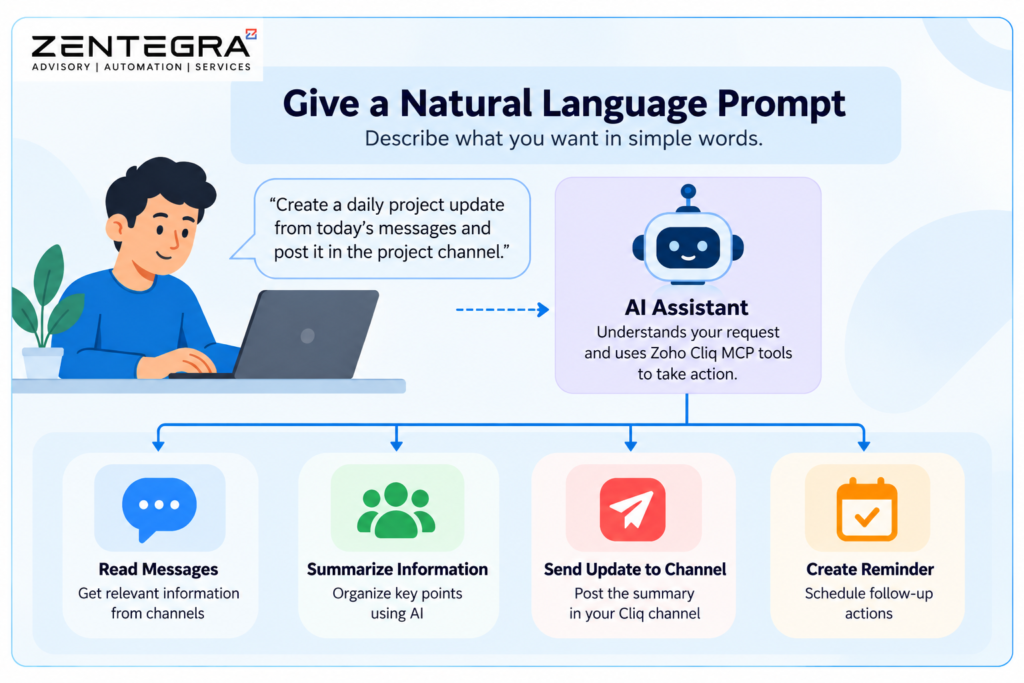
Zoho Cliq’s MCP integration allows compatible AI clients to interact with supported Cliq features through a configured MCP server. Instead of asking an AI assistant only to explain a task, you can give it access to tools that retrieve information or perform specific actions.
According to the official Zoho Cliq MCP tools documentation, supported capabilities include messaging, channels, reminders, users, teams, events, files, and other workspace functions.
These tools can help AI assistants work with your collaboration environment while reducing the need to switch between applications.
How the Cliq developer platform fits in
The Cliq developer platform provides building blocks for custom business solutions, including bots, functions, handlers, integrations, and Deluge scripting.
MCP adds another way to interact with these capabilities through AI-assisted instructions. Instead of manually navigating every configuration screen, you can describe the intended outcome and ask an AI assistant to help with the appropriate supported operation.
For instance, you might request a custom function that displays an approval button in a message. The assistant can help create or update the relevant function and handler if the required tools and permissions are available.
You should still review the generated configuration and test the result before releasing it to your team.
How Vibe Coding Automation Works with Cliq MCP
The process combines natural-language instructions, AI reasoning, connected tools, and the Cliq platform.
Step 1: Define the business problem
Start with a task that consumes time or causes delays.
For example, a sales team may need a daily summary of important updates in its Cliq channels. The objective is to collect relevant information and deliver a concise report to the right people.
Define the audience, information needed, timing, and expected result before building anything.
Step 2: Connect an AI assistant
Create a Zoho MCP server and select the Cliq tools needed for your workflow.
Follow Zoho’s guide to configuring an MCP server to create your server, select the required Cliq tools, and obtain the connection details needed to connect a compatible AI client.
You can then connect a supported MCP client, such as a compatible coding assistant, using the relevant setup instructions. Available clients and connection requirements may vary.
Step 3: Write a clear prompt
Tell the AI assistant what to do, where to do it, and what conditions it must follow.
For example:
“Review the messages available in the sales channel from today. Summarise important wins, customer concerns, and pending follow-ups. Post the summary in the sales updates channel. Do not include private customer information.”
This prompt defines the source, reporting period, output, destination, and a privacy constraint.
A specific prompt gives the assistant clearer instructions than a vague request such as “automate sales reporting.”
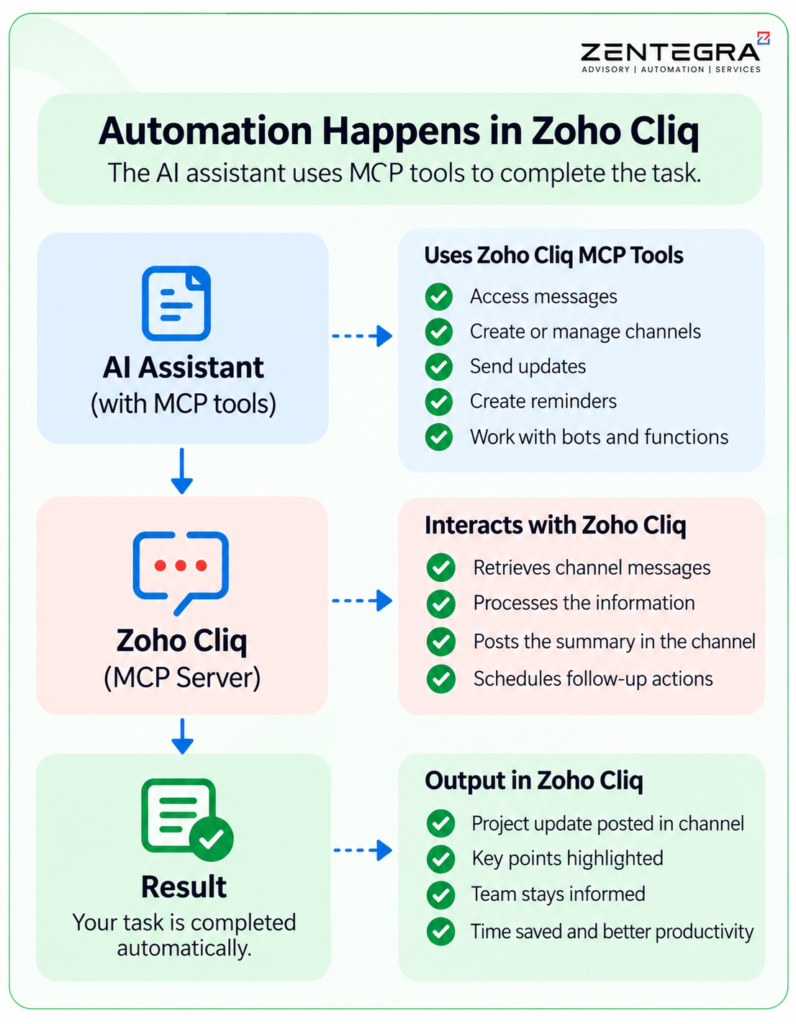
Step 4: Let the assistant use the available tools
The assistant identifies suitable tools and may retrieve information, create resources, send messages, or configure supported functions.
Some requests may require several tool calls. Others may need additional details before the assistant can proceed.
The result depends on the configured tools, access rights, required parameters, and the assistant’s ability to interpret the task correctly.
Step 5: Test, review, and improve
Check the output against the original requirements. Confirm that messages reach the correct channels, reminders use the correct dates, and generated code handles unexpected inputs.
If something is wrong, refine the instructions or adjust the implementation. Keep testing until the workflow behaves as expected.
Practical Use Cases for Zoho Cliq Workflow Automation
The value of AI automation becomes clearer when applied to everyday business processes. For more ideas, explore AI automation workflows for small businesses to see how businesses can connect tasks, reduce manual work, and improve operational efficiency.
Use case | What you can ask AI to do | Business benefit |
Team notifications | Post updates in the correct channel | Reduces manual communication |
Meeting coordination | Create supported calendar events and reminders | Helps teams stay organised |
Project updates | Summarise relevant discussions and share action items | Improves visibility |
Custom functions | Create or update supported functions and handlers | Speeds up development |
Channel management | Create channels and manage membership where permitted | Simplifies collaboration |
Bot management | Configure supported bot actions and messages | Supports repeatable workflows |
1. Automate project updates
Project teams often share progress across multiple discussions. Important decisions can get lost in long message threads.
With suitable message-reading tools, an AI assistant can help summarise accessible conversations and post key updates to a designated channel.
A useful prompt might be:
“Summarise the main project decisions, completed work, blockers, and next steps from today’s accessible messages. Post the summary in the project updates channel.”
Team members can review the report instead of searching through every conversation.
2. Build custom approval workflows
Businesses often need approvals for expenses, content, internal requests, and operational changes.
Using the Cliq developer platform, teams can build functions with interactive buttons or forms. MCP tools can assist with supported function and handler configuration.
For example, an AI assistant could help create an approval form that captures the requester’s name, request details, and approval status.
Before deployment, define who can approve requests, what happens after rejection, and how the system records decisions. Keep financial or sensitive approvals subject to appropriate human review.
3. Improve sales team coordination
Sales representatives need timely updates about leads, meetings, and follow-ups.
A Cliq-based workflow can help organise reminders, share updates, and keep relevant conversations visible to the team. If your process also depends on CRM data, confirm that the necessary CRM integration and permissions are available rather than assuming Cliq MCP automatically provides access to every Zoho application.
This creates a more organised process while allowing salespeople to focus on customer conversations.
4. Create useful bots and functions
Bots can deliver information and respond to events. Functions can handle specific interactions, such as button clicks or form submissions.
With AI-assisted development, you can describe the required behaviour and ask for help creating the relevant configuration or Deluge logic. When a workflow needs to connect different business applications, Zoho Flow business automation offers another way to automate processes across supported services.
For example, a team might want a bot to publish a daily reminder about pending internal tasks. The assistant can help implement the supported components, while a developer reviews the trigger, logic, permissions, and failure handling.
Vibe Coding vs Traditional Automation
Both approaches can produce useful workflows, but they serve different needs.
Factor | Vibe coding with MCP | Traditional development |
Starting point | Plain-language instructions | Technical requirements and code |
Development | AI-assisted configuration and implementation | Manual or tool-assisted implementation |
Best suited for | Prototypes, routine tasks, and faster iteration | Complex logic and specialised requirements |
Technical review | Still necessary | Still necessary |
Control | Depends on tools and permissions | Depends on implementation and access controls |
Vibe coding can reduce the effort required to get started. Traditional development remains valuable when workflows need complex business rules, strict controls, or specialised integrations.
Many organisations will benefit from combining both methods.
Best Practices for Reliable AI Automation
A useful automation must do more than work once. It should behave consistently, protect business information, and remain manageable as requirements change.
Follow these practices when implementing Zoho Cliq workflow automation.
Write specific prompts: Name the relevant channel, user, date range, action, and expected result. Avoid instructions that leave critical details open to interpretation.
Use only necessary tools: Enable the MCP tools required for the task rather than giving an assistant unnecessary access. Follow your organisation’s access policies.
Test before deployment: Start with a test channel or non-critical workflow. Check normal conditions, missing information, duplicate requests, and unexpected inputs.
Protect sensitive information: Review what conversations and files the assistant can access. Avoid exposing customer details, credentials, financial records, or confidential discussions in inappropriate channels.
Add safeguards to important actions: Require human approval for high-impact operations such as financial decisions, external communications, or destructive changes.
Review generated code: AI-generated Deluge scripts and configurations can contain errors. Check the logic, permissions, error handling, and execution history.
Monitor performance: Review failures and refine prompts or code as your processes evolve. Keep clear documentation so another team member can understand and maintain the workflow.
These practices help turn quick AI-generated solutions into reliable business tools.
How Zentegra Can Help Your Business
Choosing the right automation approach requires an understanding of your business processes, current systems, and operational goals.
Zentegra helps businesses explore Zoho-based business automation and identify opportunities to improve how their teams work. This includes evaluating repetitive processes, selecting suitable tools, and planning practical automation solutions.
If your organisation uses Zoho Cliq for team communication, consider starting with one recurring task, such as project reporting, reminder management, or internal request handling.
Measure the time saved, error rate, and user experience before expanding the solution. A focused pilot can reveal whether the workflow needs more integrations, stronger approval rules, or custom development.
Explore Zentegra to learn more about business automation solutions and how they can support your organisation’s needs.
Frequently Asked Questions
Yes. Zoho supports the Model Context Protocol (MCP) through tools that connect compatible AI assistants with supported Zoho applications. For example, Zoho Cliq MCP tools enable AI-assisted actions such as managing channels, sending messages, and handling reminders, depending on the available tools and permissions.
The cost depends on the Zoho application, your subscription plan, and the AI client you use. MCP availability does not automatically mean every related feature is free. Check the relevant Zoho product documentation and pricing details before setting up your integration.
No. Zoho Cliq is a team communication and collaboration platform, not a CRM. It helps teams exchange messages, manage channels, and coordinate work. For customer relationship management, Zoho offers Zoho CRM, which helps businesses manage leads, contacts, sales activities, and customer relationships.
Zoho MCP availability and access depend on the specific application, supported integration, and current subscription requirements. Although Zoho One includes access to multiple Zoho applications, you should verify whether the MCP tools you need are available for your account and whether any additional setup or third-party AI client requirements apply.
Conclusion
Vibe coding automation with Zoho Cliq MCP tools gives businesses a more accessible way to turn everyday ideas into practical workflows. By describing tasks in plain language, teams can use AI assistants to interact with supported tools, organise communication, create custom functions, and reduce repetitive work.
At Zentegra, we believe that the right business automation approach can help teams improve productivity, simplify daily operations, and work more efficiently. By combining clear prompts with the right tools, careful permissions, thorough testing, and ongoing monitoring, businesses can build reliable automation solutions.
Start with a simple, low-risk process. Measure its impact, refine the workflow, and expand only when the results justify it. With Zentegra’s focus on Zoho business automation, your organisation can explore smarter ways to streamline workflows while maintaining control and reliability.