

Managing inventory becomes increasingly difficult as a business grows. More products, sales channels, warehouses, suppliers, and customer orders can make it harder to maintain accurate stock levels and keep operations running efficiently. For businesses looking to connect their operations through a Zoho ecosystem for SMBs, integrating inventory management with other business processes can help create a more connected and efficient workflow.
Zoho Inventory Management helps businesses centralize inventory tracking, warehouse operations, sales orders, purchasing, shipping, and order fulfillment in one connected platform. This gives teams better visibility into stock movement while reducing manual processes and operational errors.
In this guide, we’ll explore what Zoho Inventory is, how its key features work, the benefits it offers businesses, and how to implement it effectively as your operations grow.
Why Businesses Struggle With Inventory Management
Inventory management may seem simple when a business has a small number of products and orders. However, as operations grow, managing inventory manually becomes increasingly difficult.
Sales teams may use one system, warehouse teams another, and finance teams a completely separate platform. This creates disconnected information and makes it difficult to understand what is happening across the business in real time.
Common inventory challenges include:
- Incorrect stock counts
- Overselling products
- Stock shortages
- Delayed order fulfillment
- Poor warehouse visibility
- Manual data entry
- Difficulty tracking incoming stock
- Inaccurate purchase planning
A centralized Zoho inventory management software solution can help reduce these challenges by connecting inventory, sales, purchasing, warehouses, and fulfillment processes in one place.
What Is Zoho Inventory Management?
Zoho Inventory Management refers to using Zoho Inventory to organize and control the movement of products throughout a business.
This includes tracking available stock, monitoring products across warehouse locations, processing sales orders, managing purchase orders, receiving incoming items, and following products through fulfillment and shipping.
Instead of manually updating multiple spreadsheets after every sale or purchase, businesses can create more connected workflows where inventory information is updated as transactions take place.
For growing businesses, this can improve operational visibility and make it easier to identify stock-related issues before they affect customers.
What Is Zoho Inventory?
Zoho Inventory is a cloud-based inventory and order management platform designed for businesses of all sizes. It helps businesses manage inventory tracking, warehouse operations, sales orders, purchasing, shipping, invoicing, and reporting from one centralized dashboard.
The platform also integrates with other Zoho applications and third-party systems, helping businesses create a connected operational workflow with better visibility and control. Businesses using financial applications can also explore how the Zoho Finance Suite supports accounting and operational management for growing companies.
Key Features of Zoho Inventory Management
Inventory and Item Management
Every effective inventory process starts with accurate product information. Zoho Inventory allows businesses to organize items and maintain important details such as product names, SKUs, pricing, stock quantities, and vendor information.
A well-structured item database helps improve inventory tracking, order processing, reporting, and purchasing decisions. As product catalogs grow, maintaining consistent information becomes increasingly important.
Businesses can also organize products in a way that makes it easier for teams to find, manage, and monitor inventory.
Multi-Warehouse Management
Businesses operating from multiple warehouses, retail locations, or distribution centers need visibility into where their stock is located.
Zoho Inventory can help businesses manage inventory across multiple locations and monitor stock movement between them. This gives operations teams better control over inventory distribution and can help them make more informed fulfillment decisions.
Instead of treating all stock as a single number, businesses can gain better visibility into inventory at individual locations.
This is particularly useful for growing ecommerce businesses, wholesalers, distributors, and companies with expanding fulfillment operations.
Sales Order and Order Management
A structured sales process is essential for efficient inventory management.
When a customer places an order, businesses need a clear process to manage the transaction from confirmation through fulfillment. Zoho Inventory supports sales order workflows and helps teams keep track of order progress.
A typical workflow may include:
- Creating a sales order
- Confirming product availability
- Preparing or packaging the order
- Creating shipment information
- Tracking fulfillment progress
- Completing the associated financial process
By connecting these activities, businesses can reduce manual coordination and gain better visibility into customer orders.
Purchase and Vendor Management
Inventory management is not only about selling products. Businesses also need to manage how products enter the organization.
Zoho Inventory supports purchasing workflows that can include vendors, purchase orders, incoming stock, and inventory updates. When purchasing information is properly connected to inventory data, businesses can make better replenishment decisions.
This can help businesses:
- Track purchase requirements
- Manage vendor information
- Monitor incoming inventory
- Improve stock replenishment
- Reduce the risk of stock shortages
A connected purchasing process is especially important when businesses manage large product catalogs or depend on multiple suppliers.
Real-Time Inventory Tracking and Stock Visibility
One of the most important benefits of a modern inventory management system is improved visibility.
Businesses need more than a simple total stock number. They need to understand what inventory is available, what has already been committed to customer orders, and what stock is expected to arrive.
Better stock visibility can help teams identify:
- Fast-moving products
- Low-stock items
- Available inventory
- Committed inventory
- Incoming stock
- Potential fulfillment issues
This information helps businesses make faster operational decisions and improve coordination between sales, purchasing, and warehouse teams.
Benefits of Zoho Inventory Management
The value of Zoho Inventory Management goes beyond simply recording product quantities.
Improved Inventory Accuracy
A centralized system can reduce the dependency on manually updating multiple spreadsheets and disconnected applications.
Better Operational Visibility
Teams can gain a clearer view of inventory, orders, purchases, and fulfillment activities.
Faster Order Fulfillment
Connected sales and inventory workflows can help teams process orders more efficiently.
Improved Warehouse Control
Businesses with multiple locations can better monitor where inventory is stored and how it moves between locations.
Reduced Manual Work
Connected workflows can reduce repetitive data entry and improve coordination between departments.
Better Purchasing Decisions
Inventory information can help businesses identify replenishment needs and plan purchases more effectively.
Improved Customer Experience
Better stock visibility and fulfillment processes can help businesses reduce delays and avoid issues such as accepting orders for unavailable products.
Zoho Inventory Integrations
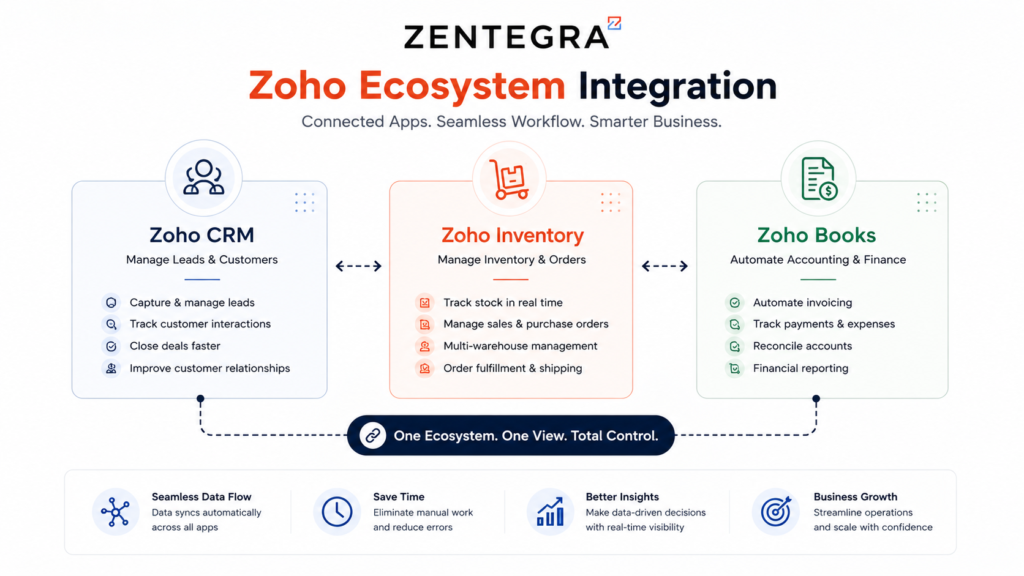
Inventory rarely operates independently. For most businesses, inventory data needs to connect with sales, accounting, ecommerce, shipping, and customer information.
- Zoho Inventory and Zoho Books: The integration between Zoho Inventory and Zoho Books can help businesses connect inventory operations with accounting processes.
For example, items, contacts, sales transactions, and purchase-related information can be part of a more connected workflow, reducing duplicate data entry between operational and financial systems.
Businesses interested in connected finance and inventory operations can also explore the
- Zoho Inventory and Zoho CRM: For businesses that manage customer relationships and sales activities in a CRM, connecting sales information with downstream inventory operations can create a more unified process.
Product and customer information can be better aligned across sales and operational teams, helping reduce information gaps.
- Ecommerce and Shipping Integrations: Businesses selling through online stores often need inventory information to remain aligned across multiple channels.
Zoho Inventory can support connected workflows with ecommerce platforms and shipping services, helping businesses manage orders and fulfillment more efficiently.
How the Zoho Inventory Dashboard Helps Businesses
The dashboard acts as the operational control center of the business. Instead of switching between multiple systems, teams can monitor inventory, sales, purchasing, and delivery activities from one place.
Dashboard Feature | Purpose |
Sales Activity | Tracks orders and revenue |
Purchase Activity | Monitors incoming stock |
Inventory Insights | Shows stock levels |
Shipment Status | Tracks deliveries |
Warehouse Updates | Displays stock movement |
This real-time visibility helps businesses quickly identify low stock items, delayed shipments, fast-selling products, and purchase requirements, improving operational control and faster decision-making.
The Foundation of Inventory Management
Every inventory system starts with products. In Zoho Inventory, products are managed through the “Items” module, where businesses can store important information such as product names, SKUs, pricing, tax details, stock quantities, and vendor information.
A proper item structure improves order processing, warehouse management, reporting accuracy, and stock forecasting. Without accurate item management, maintaining inventory visibility becomes difficult as operations grow.
This is one reason many companies adopt a zoho stock management strategy early in their growth phase.
Warehouse Management Made Simple
Modern businesses often operate from multiple locations, including warehouses, retail outlets, and distribution centers. Managing stock across these locations manually can quickly become complicated.
Zoho Inventory allows businesses to manage multiple warehouses from one platform. Teams can track inventory by location, transfer stock between warehouses, and monitor stock movement in real time.
This improves warehouse visibility, reduces stock discrepancies, and helps businesses fulfill orders more efficiently
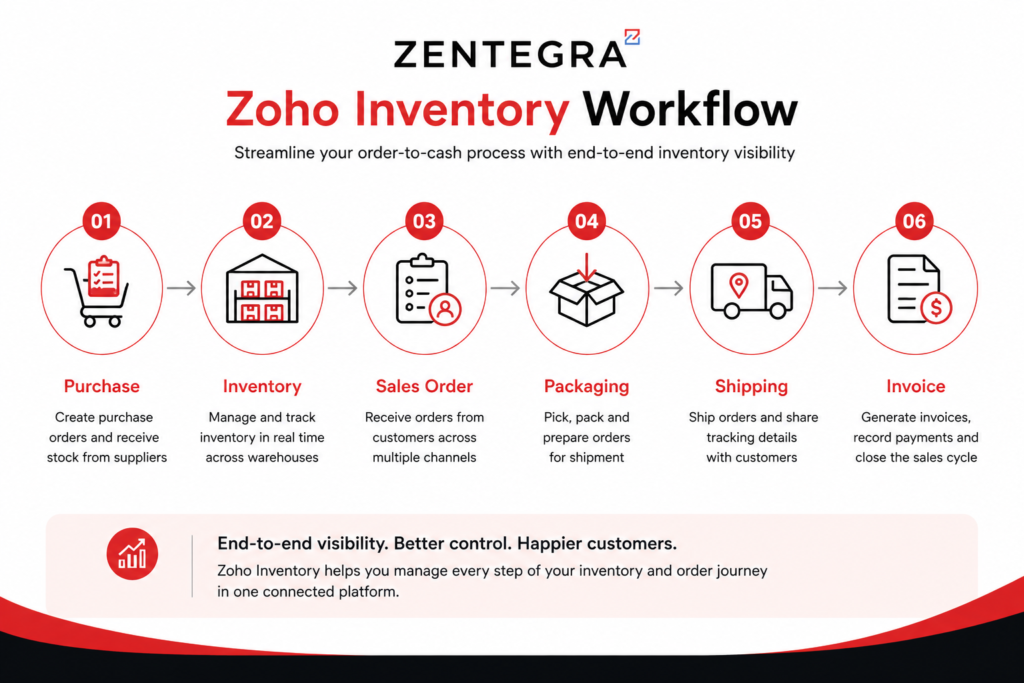
Understanding the Sales Flow in Zoho Inventory
One of the strongest Zoho Inventory feature is its structured sales workflow.
Instead of handling sales manually, businesses follow a clear operational process.
Step 1: Sales Order
A sales order records customer intent to purchase.
It includes:
- Customer details
- Product quantities
- Pricing
- Delivery requirements
This creates the first stage of fulfillment.
Step 2: Package
Once confirmed, the business prepares the products for shipment.
Packaging helps warehouse teams organize items before dispatch.
Step 3: Shipment
After packaging, the order moves to shipment.
Businesses can track delivery progress and shipping status directly inside the system.
Step 4: Invoice
The final stage generates the invoice.
This updates financial records and completes the sales cycle.
This updates financial records and completes the sales cycle. Businesses wanting deeper accounting integration can also learn from this Zoho Books beginner guide to understand how financial workflows connect with inventory operations.
This workflow creates controlled fulfillment rather than unstructured selling.
Businesses gain:
- Better tracking
- Faster delivery
- Reduced manual errors
Improved customer experience
That is why many companies searching for a Zoho Inventory Complete Guide focus heavily on sales workflow automation.
How Purchase Management Works
Inventory management is not only about selling products. Businesses also need a proper system to manage how stock enters the organization.
Zoho Inventory simplifies purchasing through a connected workflow that includes purchase orders, item receipts, vendor billing, and automatic stock updates. Once products arrive, inventory quantities update automatically inside the system, improving inventory accuracy and warehouse coordination.
This helps businesses avoid stock shortages, improve vendor management, and track procurement costs more efficiently.
Real-Time Stock Visibility Changes Everything
One major challenge in inventory management is lack of visibility. Many businesses only track total stock numbers, but that alone is not enough for efficient operations.
Zoho Inventory provides deeper stock visibility through categories such as:
Stock Type | Meaning |
Available Stock | Products ready for sale |
Committed Stock | Products already ordered |
Incoming Stock | Products currently on the way |
This helps sales teams understand what can be sold, warehouse teams know what needs preparation, and purchasing teams identify replenishment requirements more accurately.
Real-time visibility reduces overselling and improves delivery planning across operations.
Reports That Help Businesses Make Better Decisions
Zoho Inventory includes reporting tools that help businesses understand operational performance and inventory trends. Teams can monitor inventory movement, sales performance, warehouse activity, and product demand from one place.
These reports help businesses identify:
- Fast-selling products
- Slow-moving inventory
- Stock replenishment needs
- Warehouse performance trends
Instead of relying on assumptions, businesses can make decisions using real-time operational data. Companies looking for advanced business reporting can also explore this Zoho Analytics dashboard guide for deeper operational insights and performance tracking.
Zoho Inventory Integrations Improve Efficiency
A major advantage of Zoho Inventory is its integration ecosystem. The platform connects with systems such as Zoho Books, Zoho CRM, ecommerce platforms, shipping providers, and payment tools.
This creates a connected workflow where inventory, sales, accounting, and shipping operations update automatically without manual work. As a result, businesses improve operational efficiency and reduce errors across departments.
Why Growing Businesses Choose Zoho Inventory
As businesses scale, operations become more complex. More orders, products, warehouses, and customers create new management challenges.
Zoho Inventory helps businesses maintain operational control through automation, real-time visibility, and connected workflows. Companies benefit from better inventory accuracy, faster order fulfillment, reduced manual work, and improved customer experience.
For modern businesses looking to improve efficiency and scale operations smoothly, a zoho inventory management system offers a reliable long-term solution.
Final Thoughts
Inventory management affects every part of a business. Without proper systems, operations become slow, confusing, and difficult to scale.
A modern Zoho inventory management system helps businesses connect inventory, sales, warehouses, shipping, and accounting into one streamlined workflow. With better visibility, automation, and operational control, businesses can improve efficiency, reduce manual effort, and scale with confidence.
At Zentegra, we help businesses implement and optimize Zoho solutions to streamline operations, improve inventory visibility, and support long-term business growth.






