
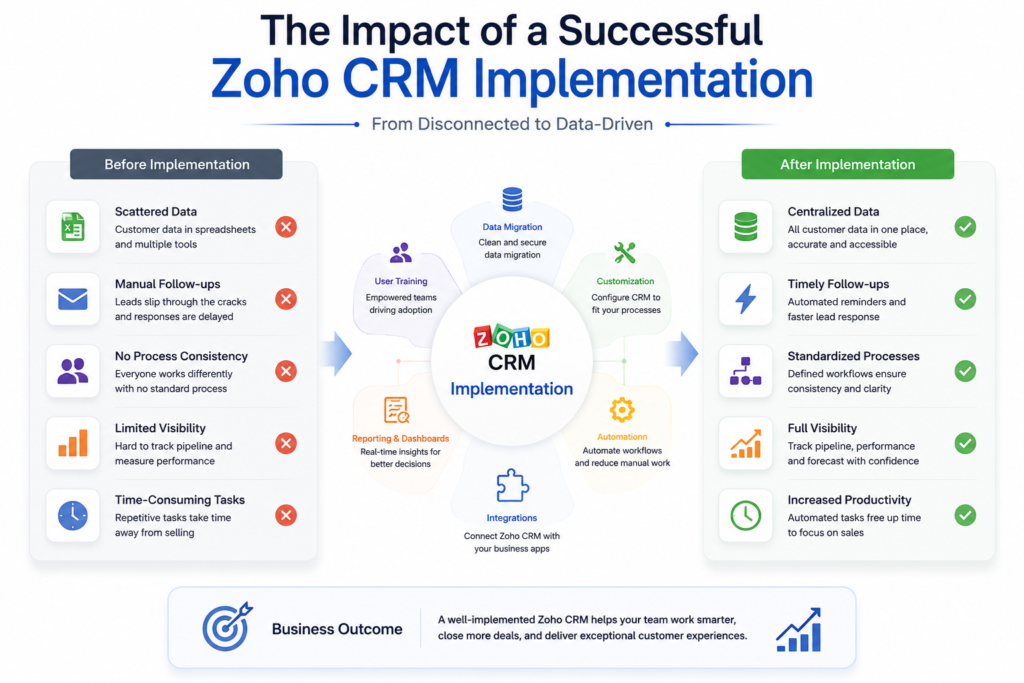
Implementing Zoho CRM is more than creating an account, adding users, and importing contacts. A successful Zoho CRM implementation involves understanding your business processes, configuring the CRM around those processes, migrating reliable data, automating repetitive work, connecting other applications, testing the system, and preparing users for adoption.
Whether you are moving from spreadsheets, replacing another CRM, or improving an existing Zoho environment, the goal is the same: build a CRM that supports the way your business actually works.
This Zoho CRM implementation guide explains the complete process, from planning and configuration to migration, automation, testing, training, and ongoing optimization.
Before customization begins, it helps to understand the platform’s core capabilities, including the features and configuration options available in Zoho CRM. Businesses new to the platform can also explore Zentegra’s guide to Zoho CRM setup and features to understand the foundation before moving into implementation.
What Is Zoho CRM Implementation?
Zoho CRM implementation is the process of planning, configuring, customizing, testing, and deploying Zoho CRM according to a company’s business requirements.
A basic CRM setup may involve creating users and entering records. A structured implementation goes further by defining how leads are captured, qualified, assigned, followed up with, converted into opportunities, and moved through the sales pipeline.
Depending on business requirements, implementation may include:
- Business process mapping
- CRM module and field configuration
- Roles and permissions
- Data migration
- Workflow automation
- Blueprints and approval processes
- Third-party integrations
- Reports and dashboards
- Testing and deployment
- User training
- Post-launch optimization
The objective is not to activate every available feature. It is to configure the features that solve real business requirements.
Zoho’s own implementation guidance follows a similar approach, emphasizing business objectives, processes, and people before moving into CRM configuration. Zoho’s implementation planning guidance
Zoho CRM Implementation Process: Step by Step
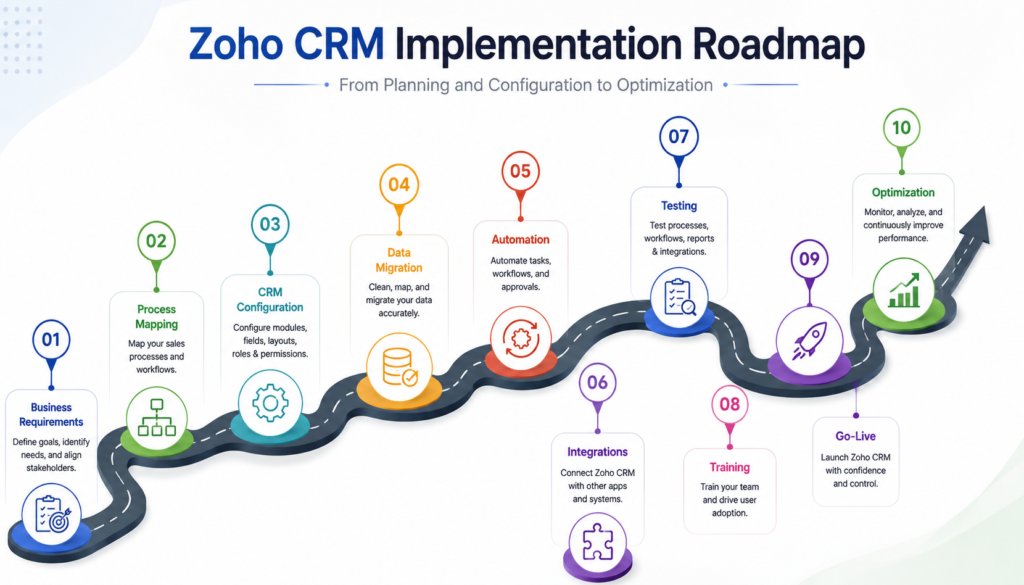
A structured Zoho CRM implementation process helps businesses move from requirements to a working CRM without unnecessary customization or disruption.
1. Define Business Requirements
Start by identifying what the CRM needs to accomplish.
Speak with the teams that will use the system and document their current processes, challenges, reporting requirements, and expected outcomes.
For example, implementation goals may include:
- Centralizing customer information
- Improving sales pipeline visibility
- Reducing manual follow-ups
- Standardizing lead management
- Improving sales reporting
- Connecting CRM with other business applications
These requirements should guide every configuration decision that follows.
2. Map Your Sales and Business Processes
Before configuring Zoho CRM, document how work currently moves through your organization.
A typical sales process might look like:
Lead Capture → Qualification → Follow-Up → Opportunity → Proposal → Negotiation → Closed Won/Lost
Your actual process may be different. The important part is to understand the stages, responsibilities, decision points, and information required at each step.
Process mapping prevents businesses from simply transferring inefficient manual processes into a new CRM.
3. Plan Modules, Fields, Roles, and Permissions
Next, determine which Zoho CRM modules and fields are required.
Start with standard modules that match your business processes and customize only where necessary. Depending on requirements, this may involve:
- Custom fields
- Layouts
- Validation rules
- Custom modules
- Record relationships
- Roles
- Profiles
- Data-sharing settings
User permissions should also be planned early. Sales representatives, managers, administrators, and other employees may need different levels of access.
A well-planned CRM gives users access to the information they need without creating unnecessary complexity.
Planning is one of the most important stages of a CRM implementation. Configuration should follow business requirements rather than the other way around. If you are implementing several Zoho applications or planning a broader transformation beyond CRM, understanding the Zoho implementation process can provide additional context on requirements gathering, configuration, migration, automation, integrations, training, and ongoing optimization.
4. Clean and Migrate Existing Data
Data migration is one of the most important stages of CRM implementation.
Data migration should be planned before the final import. Businesses need to understand which records should be transferred, how existing information maps to Zoho CRM, and how the migrated data will be validated. For platform-specific migration requirements, refer to Zoho CRM’s data migration documentation.
Before importing information into Zoho CRM, review your existing data for:
- Duplicate records
- Missing information
- Outdated contacts
- Inconsistent field values
- Unused records
- Incorrect formatting
The next step is to map existing data to the appropriate Zoho CRM modules and fields.
For example, information stored in a spreadsheet may need to be separated and mapped into Leads, Contacts, Accounts, and Deals.
After migration, validate important records and relationships before making Zoho CRM the primary working system.
Zoho CRM Configuration and Customization
Once requirements are defined, the CRM can be configured around the business process.
Zoho CRM can be customized through modules, fields, layouts, validation rules, workflows, Blueprints, dashboards, and other configuration options.
However, more customization does not necessarily mean a better CRM.
Custom modules and complex workflows should be introduced only when they address a clear business requirement. Excessive customization can make the system harder to maintain, troubleshoot, and use.
The best approach is to start with the simplest configuration that supports the required process and expand it when there is a genuine need.
Automate Repetitive Processes
Automation should follow process definition and configuration.
For businesses that need users to follow a defined process, Zoho CRM Blueprints can represent stages and transitions within a business workflow. They can also be configured with conditions, required information, and actions that occur during or after a transition. Learn about Zoho CRM Blueprints
Zoho CRM can automate activities such as:
- Lead assignment
- Task creation
- Notifications
- Field updates
- Follow-up activities
- Sales process transitions
Workflow rules can handle repetitive actions, while Blueprints can guide users through structured processes.
For appropriate sales processes, Cadences can also help organize automated follow-up activities.
Advanced requirements may require custom functions or Deluge scripting. These should be used selectively rather than adding unnecessary technical complexity.
Integrate Zoho CRM With Other Applications
CRM data becomes more valuable when it works with the other systems your business already uses.
A Zoho CRM implementation may involve connecting CRM with:
- Marketing applications
- Accounting and finance systems
- Email and communication tools
- Document management platforms
- Customer support applications
- Booking systems
- Other Zoho applications
- Custom or legacy systems
Depending on the requirement, integrations can use native connections, Zoho Flow, APIs, or custom functions.
Every integration should have a defined business purpose. Connecting applications simply because an integration is available can create unnecessary complexity.
Test Before Going Live
Testing should take place before employees depend on the new CRM.
Where appropriate, use a sandbox environment to test configurations without affecting production data.
Test realistic business scenarios, such as:
New lead → Lead assignment → Follow-up task → Qualification → Deal creation → Proposal → Deal closure
Also verify:
- User permissions
- Workflow triggers
- Automation
- Data relationships
- Reports and dashboards
- Integrations
- Notifications
- Required fields
User acceptance testing is particularly important because an administrator may confirm that a configuration works technically while employees identify practical problems in daily use.
Testing CRM changes before deployment can help identify problems before they affect the live environment. Zoho CRM provides a Sandbox environment for testing and validating configurations before deploying approved changes to production. Zoho CRM Sandbox documentation
Train Users and Prepare for Go-Live
A technically successful CRM implementation can still fail if users do not understand how to use it.
Training should focus on the tasks employees actually perform.
For example:
Sales representatives may need training on lead management, deals, activities, and follow-ups.
Managers may need training on pipeline visibility, reports, dashboards, and team performance.
Administrators may need deeper training on configuration, automation, and user management.
Before go-live, communicate the new processes clearly and establish guidelines for maintaining consistent CRM data.
How Much Does Zoho CRM Implementation Cost?
There is no single implementation cost because every project has a different scope.
The overall investment can depend on:
- Number of users
- Zoho CRM edition
- Number of modules
- Customization requirements
- Data volume and migration complexity
- Automation requirements
- Number of integrations
- Custom development
- Training requirements
- Ongoing support
A simple implementation may require basic configuration and migration, while a complex CRM transformation can involve multiple applications, advanced automation, integrations, and custom development.
For this reason, implementation should be estimated based on business requirements rather than a fixed checklist.
Common Zoho CRM Implementation Mistakes
Businesses can avoid many implementation problems by addressing common mistakes early.
Skipping process mapping: Configuring CRM before understanding the business process can result in a system that does not match how teams actually work.
Over-customizing: Too many fields, modules, and workflows can make the CRM unnecessarily complicated.
Migrating poor-quality data: Moving duplicate or outdated records into the new CRM transfers existing problems into the new system.
Ignoring permissions: Poor access planning can create confusion and unnecessary data exposure.
Automating too early: Automation should support a defined process rather than automate an inefficient one.
Skipping testing: Problems with workflows, permissions, and integrations should be identified before go-live.
Neglecting training: Users need to understand both how the CRM works and why the new process matters.
When Should You Work With a Zoho CRM Certified Partner?
A business may be able to handle a simple CRM setup internally. However, professional Zoho CRM implementation services can be valuable when the project involves complex customization, migration, automation, integrations, or multiple Zoho applications.
When evaluating a Zoho CRM Certified Partner, consider:
- Relevant Zoho certifications
- Previous implementation experience
- Data migration capabilities
- Automation and integration expertise
- Customization experience
- Training and support
- Experience with similar business requirements
The right partner should focus on understanding your processes rather than applying a standard configuration to every business.
If your implementation involves complex customization, migration, automation, integrations, or multiple Zoho applications, choosing the right implementation partner becomes particularly important. Before making a decision, you can also review this guide on choosing a Zoho CRM Certified Partner to understand what to evaluate.
How Zentegra Supports Zoho CRM Implementation
Zentegra approaches Zoho implementation by aligning CRM configuration with business requirements.
The process can include:
Business Process Discovery: Understand current workflows, requirements, users, and objectives.
CRM Configuration: Configure modules, fields, layouts, permissions, automation, and other required components.
Data Migration: Clean, map, migrate, and validate existing business data.
Automation and Integration: Connect relevant systems and automate repetitive processes where there is a clear business benefit.
Testing and Training: Validate important workflows and prepare users before deployment.
Ongoing Optimization: Review the CRM after launch and make improvements as business requirements change.
Zentegra states that its team includes 18 certified Zoho professionals and has served 200+ clients, supporting implementation, customization, automation, and broader Zoho ecosystem requirements.
Common Zoho CRM Implementation Mistakes to Avoid
Starting Without Mapping Business Processes : Do not configure the CRM before understanding how the business operates.
Over-Customizing the CRM : Customization should solve a business problem. Adding unnecessary fields, modules, and workflows can make the system harder to manage.
Migrating Unnecessary or Poor-Quality Data : Moving every old record into the new CRM can transfer existing data problems into a new system.
Ignoring User Roles and Permissions : Poor access planning can create confusion and unnecessary exposure to data.
Automating Processes Before Defining Them : Automation should support a stable process. Otherwise, it can simply make an inefficient process happen faster.
Launching Without Testing : Use available testing environments and validate important workflows before deployment. Zoho specifically supports sandbox testing for CRM configurations and integrations.
Failing to Train CRM Users : Even a well-configured CRM can struggle if employees do not understand how and when to use it.
How Zentegra Approaches Zoho CRM Implementation
Zentegra positions its Zoho services around business transformation rather than software configuration alone. Its current certification page states that the team includes 18 certified Zoho professionals, has served 200+ clients, and provides implementation, customization, and ongoing optimization across the Zoho ecosystem.
Business Process Discovery : The first step should be understanding what the business needs the CRM to accomplish.
CRM Configuration and Customization : Zentegra can then align the Zoho environment with the defined requirements rather than applying a one-size-fits-all setup.
Data Migration and Validation : Existing business data can be reviewed, mapped, migrated, and validated according to project requirements.
Automation and Integration : Relevant workflows and integrations can connect CRM with other parts of the business ecosystem.
Testing, Training, and Go-Live : Testing and user training help prepare the system and the team for deployment.
Ongoing Optimization and Support : Zentegra’s broader service model includes implementation, automation, integrations, and ongoing support, allowing businesses to continue improving their Zoho environment after deployment.
Conclusion: Build Your CRM Around Your Business
A successful Zoho CRM implementation starts with business requirements rather than software configuration.
The process involves mapping business processes, planning CRM structures, configuring the system, migrating clean data, implementing automation, connecting applications, testing workflows, training users, and continuously improving the CRM after launch.
The right approach is not to customize everything Zoho CRM offers. It is to build a system that makes your team’s actual processes easier, more consistent, and more measurable.
For businesses that need help with complex configuration, migration, automation, or integrations, working with experienced Zoho CRM implementation services can reduce implementation risks and provide a structured path from planning to go-live.
Planning a Zoho CRM implementation? Talk to Zentegra about your business requirements and build a CRM environment around the way your team works.