Running a growing business often creates a familiar problem: more customers bring more leads, more sales create more invoices, and more employees create more approvals and administrative work.
The usual answer is to hire more people. But AI automation offers another option: automate repetitive work before adding headcount. In 2026, this is becoming a practical strategy for small businesses, not just an enterprise technology trend. Businesses looking to improve their processes can explore Zentegra’s business automation solutions to understand how connected technology can support growth.
Intuit QuickBooks’ July 2026 Small Business Insights found that 80% of surveyed small businesses now use AI regularly, up from 48% in July 2024. Marketing, customer service, and data processing are among the leading uses.
The opportunity is not to replace employees. It is to remove low-value work so your team can spend more time on customers, sales, problem-solving, and decisions.
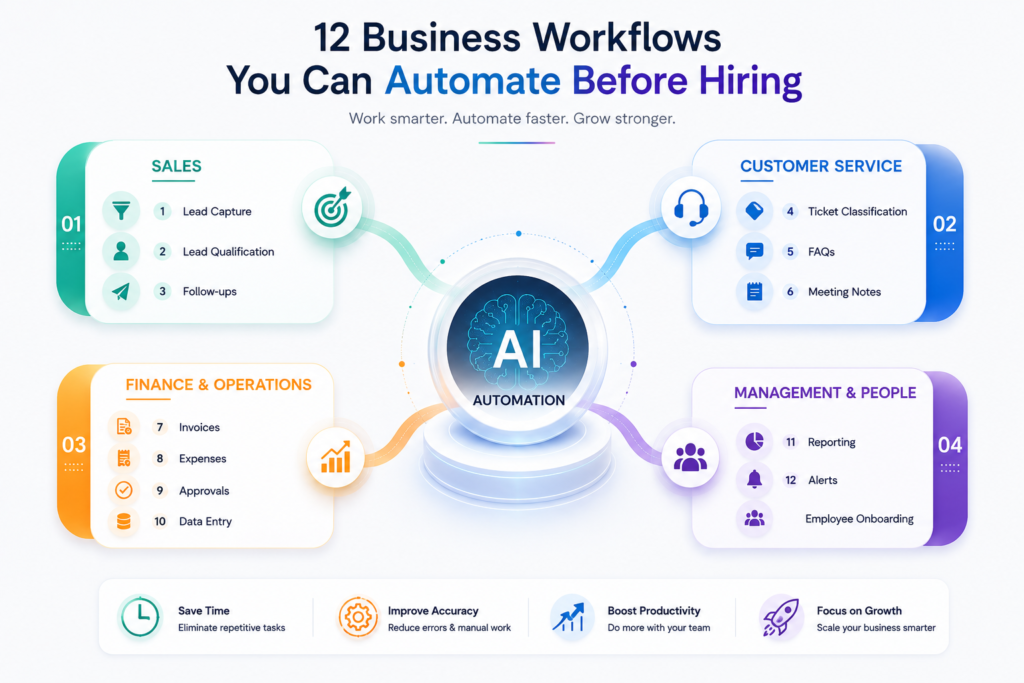
Here are 12 workflows worth considering before you hire another person to handle repetitive tasks.
Why Small Businesses Should Consider AI Automation Before Hiring
Small businesses often operate with lean teams. One person may handle sales, customer communication, administration, reporting, and coordination. As the company grows, these manual tasks can quickly become bottlenecks.
Business process automation can take predictable steps out of employees’ daily workload. Workflow automation can then connect those steps across different applications.
AI adds another layer. Traditional automation follows fixed rules, while AI can interpret emails, classify requests, summarize information, extract data, and help determine what should happen next. Workflow automation, for example, can handle repetitive tasks such as data entry, approvals, and routing while keeping larger business processes moving. workflow automation
The latest QuickBooks research shows that AI use is highest in areas such as marketing, administration, and customer service, while businesses remain more cautious where human judgment is important.
How AI Automation Helps Small Business Teams
The biggest benefit is leverage.
Instead of hiring someone to copy data between systems, chase routine follow-ups, or prepare repetitive reports, businesses can automate those activities and keep people focused on higher-value work. A real-world Zoho automation case study from Zentegra shows how connected CRM, finance, inventory, and workflow automation helped a business save more than 15 hours every week. real-world Zoho automation case study
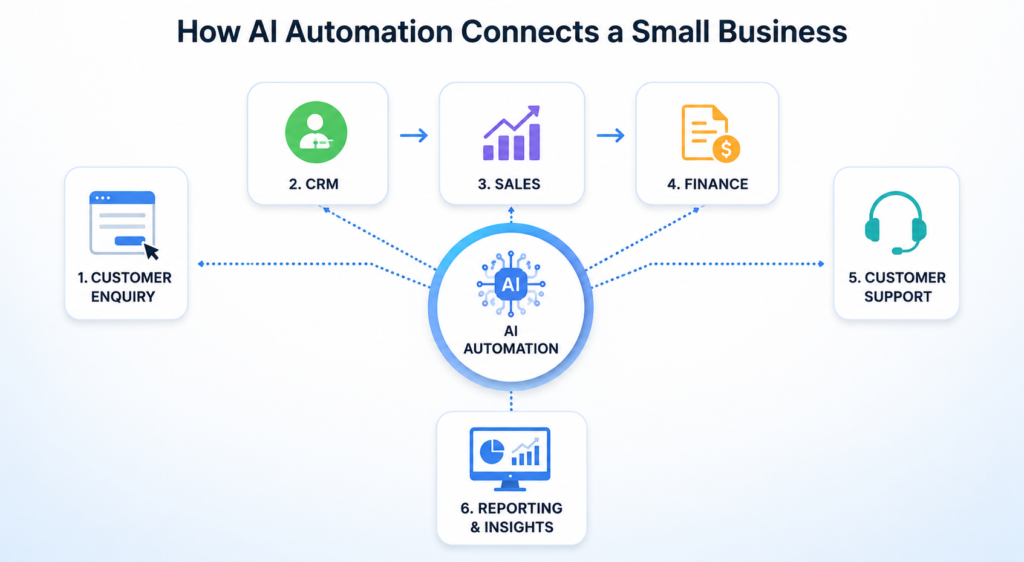
For example, a new enquiry could automatically enter the CRM, receive an acknowledgement, get assigned to a salesperson, and trigger a follow-up task.
That is not replacing the salesperson. It is removing the administrative work around the sale.
12 AI Automation Workflows Small Businesses Should Automate
1. Lead Capture and CRM Entry
When someone submits a website form, sends an enquiry, or requests a quote, automation can capture the information and create a CRM record immediately.
The workflow can identify the lead source, assign an owner, categorize the enquiry, send an acknowledgement, and create a follow-up task. It can also check whether the contact already exists, helping prevent duplicate records and keeping customer data cleaner.
This prevents leads from sitting unnoticed in inboxes or spreadsheets. More importantly, sales teams can respond faster while the enquiry is still fresh.
2. AI Lead Qualification and Prioritization
Not every prospect has the same buying intent.
AI can analyze enquiry details, company information, previous interactions, website activity, and other engagement signals to help sales teams prioritize leads. Instead of manually reviewing every enquiry, salespeople can focus their attention on prospects that show stronger buying signals.
A high-intent prospect can receive immediate attention, while lower-priority enquiries can enter an appropriate nurture workflow.
Modern AI-powered workflows can go beyond simple scoring. For example, AI-powered predictive lead scoring can analyze engagement and other CRM signals to help sales teams identify prospects with stronger conversion potential. AI-powered predictive lead scoring
3. Automated Sales Follow-Ups
Missed follow-ups are one of the simplest problems to automate.
When a prospect asks for a follow-up next week, the CRM can automatically create the task. Businesses using Zoho CRM can take this further with Zoho CRM workflow automation, using triggers to assign leads, create tasks, send notifications, and schedule follow-ups. Zoho CRM workflow automation. If there is no response, the workflow can send a reminder, schedule another follow-up, or notify the salesperson.
AI can also help draft follow-up messages using previous conversations, customer information, and deal context. This allows salespeople to personalize communication without writing every message from scratch.
The objective is not to send more emails. It is to make sure valuable opportunities do not disappear because someone forgot to follow up.
4. Meeting Notes and Action Items
Meetings create work even after they end.
Someone needs to capture decisions, summarize discussions, update the CRM, and assign tasks. When several customer or internal meetings happen each day, this administrative work can quickly consume valuable hours.
AI meeting tools can help turn conversations into summaries, action items, decisions, and follow-up information. Employees can then review the output and make corrections instead of creating everything from scratch.
The information can also be used to update relevant records or create tasks, helping ensure that important commitments from the meeting are not forgotten.
For small consulting, sales, and service teams, this can remove a significant amount of administrative work.
5. Customer Support Ticket Classification
Support teams should solve customer problems, not spend most of their time sorting tickets.
AI can read incoming requests and classify them as billing, technical support, returns, product questions, or urgent complaints. It can also identify important details from the customer’s message and previous interactions.
The workflow can then route the ticket to the right person, summarize the issue, suggest a response, or escalate it when required. For businesses using Zoho Desk, automated ticket routing in Zoho Desk can help direct incoming requests to the appropriate team or agent based on defined criteria. automated ticket routing in Zoho Desk
This helps reduce response delays and ensures that complex issues reach the right employee faster. Zoho’s current AI workflow capabilities can, for example, summarize support tickets and help determine routing based on content and priority.
6. Frequently Asked Customer Questions
Businesses answer the same questions repeatedly.
Working hours, order status, invoice copies, product information, pricing details, and basic troubleshooting are often suitable for automation.
An AI assistant connected to an approved knowledge base can handle routine questions instantly and send complex or sensitive situations to a human. This gives customers faster answers without requiring employees to monitor every simple request.
Businesses can also review the questions customers ask most often and use those insights to improve their knowledge base, website content, and support processes.
This gives employees more time to focus on situations that genuinely require judgment or personal assistance.
7. Invoice Creation and Payment Follow-Ups
Finance administration is another strong candidate for business process automation.
A completed deal or project milestone can trigger invoice creation. The system can send the invoice, update the relevant records, track its status, and send payment reminders when the due date approaches. This connected approach is part of lead-to-cash automation, which can link sales activities with invoicing and payment collection in one workflow. lead-to-cash automation
Automation can also flag overdue accounts so finance teams know which customers need attention. AI can help extract information from documents or personalize routine payment communications.
The finance team still controls important financial decisions and exceptions. Automation simply removes repetitive chasing and data handling, allowing finance employees to focus on cash flow, reconciliation, and financial control.
8. Expense Processing
Employees often submit receipts through email, messaging apps, paper documents, or expense systems.
AI can extract information such as the vendor, date, amount, tax details, and expense category from a receipt. The claim can then move automatically through an approval workflow based on company policies.
The system can also flag missing information, duplicate submissions, or expenses that require additional review.
Instead of manually entering every receipt, finance employees can focus on exceptions, policy checks, and financial control. This becomes especially useful when the number of employees and monthly expenses starts increasing.
9. Approval Workflows
Approval requests often become scattered across email and chat.
Purchase requests, discounts, expenses, quotations, contracts, and other requests can follow predefined approval paths based on factors such as amount, department, or request type.
Request | Approval |
Low-value purchase | Department Manager |
Mid-value purchase | Finance Manager |
High-value purchase | Senior Management |
The system can automatically notify the appropriate approver, record the decision, and remind them when an approval is pending. This creates a clear audit trail and reduces the need for employees to repeatedly ask for status updates.
The workflow handles routing and notifications, while the appropriate person retains decision-making authority.
10. Repetitive Data Entry Between Applications
Manual data entry is one of the clearest opportunities for workflow automation.
A salesperson updates the CRM. Finance enters the customer again into accounting software. Operations creates another record. Marketing may then add the same contact to another system.
Instead, one event can trigger multiple actions:
Deal Won → Create Customer → Notify Finance → Create Project → Start Onboarding
This reduces duplicate data entry, improves consistency, and lowers the risk of human errors. It also means employees spend less time moving information between applications. Businesses looking to connect these systems can explore Zoho Flow business automation for building connected workflows between applications. Zoho Flow business automation
Zoho Flow now allows users to describe a workflow in natural language, with Zia generating an initial workflow structure from the description. generate workflows from natural language
11. Reporting and Business Alerts
Reports are useful only when businesses can act on them in time.
Rather than manually compiling spreadsheets every week, businesses can automate dashboards and alerts for sales, revenue, receivables, inventory, customer support, and project performance.
For example:
Receivables exceed the threshold → Alert Finance
Pipeline falls below target → Alert Sales Manager
Inventory reaches reorder level → Notify Procurement
AI can also help summarize large amounts of business information and highlight important changes or patterns. Managers can then spend less time collecting data and more time deciding what action to take.
The goal is not to automate management decisions. It is to make the right information available at the right time.
12. Employee Onboarding
Employee onboarding involves many repeatable steps.
A new hire may need accounts, documents, training, policies, IT access, payroll notifications, and introductory meetings. Without a structured process, important steps can easily be missed.
One onboarding trigger can launch the required workflow and assign tasks to the appropriate teams. Automated reminders can also ensure that pending tasks are completed before the employee reaches each stage of onboarding.
AI can help answer routine employee questions, provide personalized onboarding information, or direct employees to the right company resources.
As the company grows, this creates a more consistent onboarding experience without requiring someone to remember every step manually.
AI Automation Should Not Mean Automating Everything
The strongest AI strategy is not to automate every task. It is to automate the right tasks.
Where Human Judgment Still Matters
Keep humans involved when decisions involve significant financial risk, sensitive customer situations, complex negotiations, legal matters, strategic decisions, or exceptions that fall outside normal rules.
Current small-business AI adoption reflects this balance. QuickBooks reports that businesses use AI heavily for repetitive activities while keeping judgment-heavy areas more human-led.
AI should provide leverage, not remove accountability.
How to Start Automating Your Business Processes
You do not need dozens of AI tools to get started.
Identify Repetitive and Time-Consuming Tasks
Look for work that happens frequently and follows a predictable pattern:
- Manual data entry
- Repeated emails
- Routine approvals
- Customer FAQs
- Payment reminders
- Lead follow-ups
- Weekly reporting
These are often the best starting points for AI automation.
Map the Process Before Choosing an AI Tool
First document what actually happens.
Identify the trigger, the steps, the systems involved, the person responsible, and the final outcome.
Then decide what should be automated.
Decide Where Human Oversight Is Needed
Build approval points into the workflow for important decisions.
A good automated process should clearly define when AI acts, when software acts, and when a person must review the result.
How Zoho Can Help Small Businesses Automate Workflows
A connected technology ecosystem can make AI for business more practical because information can move between sales, finance, support, operations, and reporting systems.
Connect Sales, Finance, Support, and Operations
Zoho CRM can support sales workflows, Zoho Books can support financial processes, Zoho Desk can streamline customer support, Zoho Flow can connect applications, Zoho Creator can support custom applications, and Zoho Analytics can bring business data together.
The goal is not to buy every application. It is to connect the processes that create the most manual work.
Use AI to Improve Business Processes
Zoho’s current Flow capabilities include Zia-powered AI actions for tasks such as summarizing, extracting information, generating content, and making workflow decisions.
That makes AI automation more than simple if-this-then-that rules. AI can help interpret information inside a workflow and support the next action.
Before You Hire Your Next Employee, Ask One Question
Hiring is sometimes the right answer. Growing businesses need talented people.
But if the proposed role exists mainly to copy information, chase routine follow-ups, prepare repetitive reports, route requests, or coordinate predictable administrative tasks, first ask:
Can this process be automated?
The best business process automation does not make employees less important. It gives them more time to do work that requires experience, creativity, relationships, and judgment.
Start with one workflow. Measure the result. Improve it. Then move to the next.
Find the Right Workflows to Automate With Zentegra
At Zentegra, we help businesses identify repetitive processes, design smarter workflows, connect applications, and implement automation using Zoho and other business technologies.
The starting point should not be the tool. It should be the process.
If your team is spending too much time on manual administration, follow-ups, data entry, approvals, or coordination, identify the workflow first and then determine where automation can create the most value.
The goal is simple: help your existing team do more valuable work before you add more repetitive work to the payroll.